
How to Split Test a Low Traffic WordPress Website
The problem with split testing a low traffic site
Most of the advice out there about split testing assumes you have a decent volume of traffic. Get enough visitors, run the test, wait for statistical significance, pick a winner.
That works fine on a high-traffic ecommerce site getting hundreds of orders a day. It does not work so well for a local accountant, a law firm, or an IT service provider getting a handful of leads per week.
The math just does not favor you. If your site gets two leads a week and you split that traffic across two variations, you might wait three or four months before either variation has enough conversions to mean anything. By that point the test has gone stale, you have lost interest, and nothing improved.
That does not mean split testing is useless on low traffic sites. It means you are measuring the wrong thing.
Move your conversion goal higher up the funnel
The fix is straightforward. Instead of waiting for someone to fill in a contact form or complete a booking, measure something that happens earlier in the journey.
Think of your website as a funnel. The lead or booking is the very bottom. But before someone gets there, they have to scroll your homepage, read your services, watch a video, or click through to your about page. All of those things are signals of engagement. And engagement earlier in the funnel leads to conversions later.
If you can find which version of your hero section, your sub-hero content, or your opening paragraph keeps visitors more engaged, you will get more leads downstream without needing to wait for the leads themselves to tell you what worked.
The goal is to find what captures attention and holds it. The conversions follow from that.
What to measure instead
AB Split Test has several conversion goal types that work well for low traffic engagement testing:
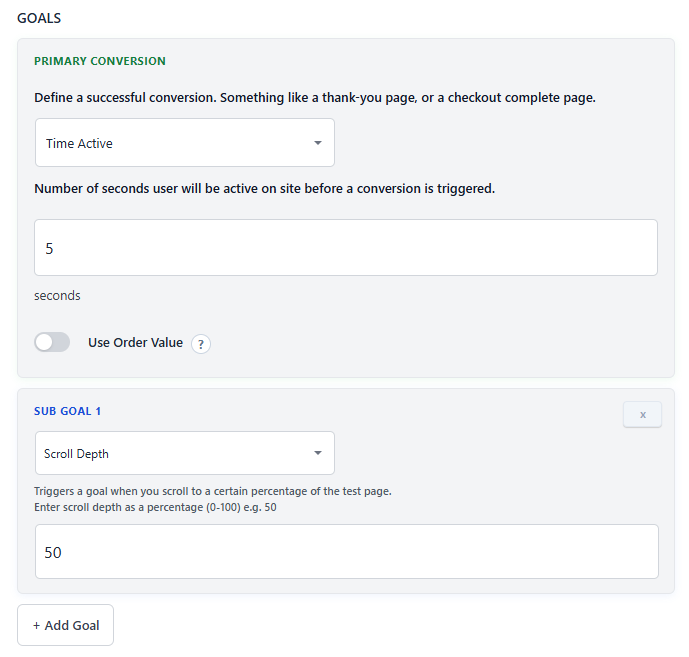
Time Active
This measures how long a visitor is actively using your site, not just how long the tab is open. The timer only runs when the visitor is scrolling, moving their mouse, or interacting with the page. So 30 seconds of active time means 30 real seconds of engagement, not 30 seconds of a forgotten browser tab.
For a low traffic site this is a great primary goal. Test two versions of your hero section and measure which one keeps visitors engaged for 30 or 60 seconds. You will get far more data points than if you were waiting for form submissions.
Scroll Depth
Added in v2.1.0, scroll depth tracking lets you set a conversion when a visitor scrolls to a specific percentage of the page. If your services section sits at 60% of the page and you want to know which hero variant gets more people there, scroll depth is the right goal.
This is especially useful for local service businesses where the goal is to get visitors reading beyond the fold and into the content that builds trust.
Form Submission
If you are using Contact Form 7, Gravity Forms, WPForms, Fluent Forms, or any of the other supported form plugins, AB Split Test tracks form submissions automatically as conversions. This is still a valid goal for low traffic sites, just slower to accumulate data. Pair it with a higher-funnel goal as a subgoal so you are collecting engagement data while waiting for the leads to come in.
What to test on a local service site
The pages that get the most traffic are always the best starting point. For most local service businesses that is the homepage, and the element that matters most on the homepage is the hero section.
A few things worth testing:
Hero headline This is the single most visible piece of copy on your site. A small change here can shift how quickly someone decides whether to keep reading. Test a benefit-focused headline against a problem-focused one, or a specific claim against a general one.
Sub-hero section The content directly below the hero often gets ignored in testing, but it is one of the first things visitors see after the hero does not immediately answer their question. Test a short intro paragraph against a bullet list of services, or testimonials against a brief explainer of the process.
Video versus static content If you have a short explainer video, test whether showing it above the fold keeps visitors on the page longer than a static image or text block. Time Active is a good goal to use here.
Call to action copy Even on a low traffic site, small copy changes on buttons and CTAs can shift click-through rates. Test "Book a free call" against "Get a quote" or "Talk to us today" and measure clicks.
Use heatmaps to find what to test before you guess
On a low traffic site every visit counts. Wasting test cycles on the wrong element is more costly than on a high traffic site where you can afford to run exploratory tests.
AB Split Test has built-in Heatmaps that show you where visitors click and how far they scroll without needing a separate analytics tool. Even a week or two of heatmap data on a low traffic site will tell you whether visitors are reaching your services section, what they are clicking on, and where they are dropping off.
Session Replays take that further. You can watch individual sessions and see exactly how a visitor moved through the page. On a low traffic site where each visitor represents a real potential lead, watching five or ten sessions can surface patterns that heatmaps alone would not show.
Use those two tools to identify the problem before you build the test. It saves you from spending weeks testing something that was never the real issue.
The Underpowered badge stops you from acting on bad data
One of the trickier parts of low traffic testing is knowing when a result is actually meaningful versus when you just got lucky with a few visits going one way.
AB Split Test now shows an Underpowered badge on any test where there are not yet enough visits per variation to draw a reliable conclusion. As of v2.5.1 each variation needs at least 50 visits before a winner can be declared. That stops you from seeing one variation up 30% after four visits and shipping it before the data means anything.
This is more important on low traffic sites than anywhere else. Be patient with the data. The badge will clear when you actually have enough to act on.
A simple setup for a local service site
Here is a starting point that works for most local service businesses:
- Install AB Split Test and run heatmaps on your homepage for one to two weeks
- Identify whether visitors are scrolling past the fold and what they are clicking
- Create a test on the hero or sub-hero section using Magic Mode
- Set the conversion goal to 30 seconds of Time Active or 50% scroll depth
- Let it run for at least two full weeks
- Wait for the Underpowered badge to clear before acting on results
- Implement the winner and start the next test
You will get more data points per week than if you were waiting for contact form submissions, and the improvements you find will lift those lead numbers too.
Worth doing even on a small site
You do not need thousands of visitors a month to improve your conversion rate. You just need the right goals, a bit of patience, and a process that fits the traffic you actually have.
Local service sites often have a huge amount to gain from small improvements because every lead is worth a lot. A 10% improvement in engagement on an accountant's homepage might mean two or three extra enquiries a month. At the value of a new client that adds up quickly.
