
Year in Review

Major Features Released in 2025
2025 was the year AB Split Test grew far beyond “run a simple A/B test.” Here are the biggest features we shipped this year.
Heatmaps
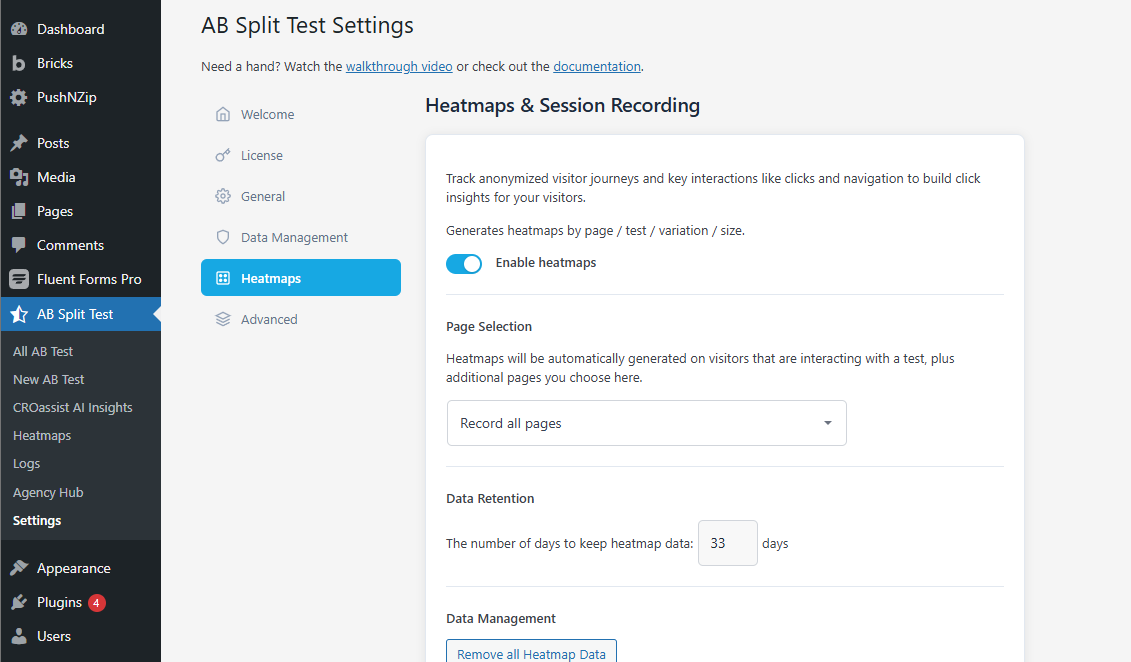
Heatmaps were a big step forward this year. A lot of you asked for a way to see what users actually do on a page without relying on external recording tools.
Heatmaps now track:
-
clicks
-
scroll depth
-
rage clicks
-
dead clicks
Everything runs locally inside WordPress, so there’s no extra script weight or privacy concerns. We also made screenshot capture and journey recording more reliable across different builders and caching setups.
If you run tests for clients, heatmaps make it easier to explain why a variation won and not just that it did.

Session Replays
Session replays take heatmaps a step further by showing the entire user journey. You can watch how someone moved through your site, where they hesitated, and what finally triggered a click or conversion.
Replays record:
-
page paths
-
cursor movement
-
clicks
-
rage clicks
-
scroll patterns
They also include filters for variations, conversions, visited pages, and active tests so you can focus on sessions that matter.
Everything is recorded locally using the same tracking layer as heatmaps. No outside servers. No performance hit. This is the closest replacement to Clarity or Hotjar we’ve seen inside WordPress. Public release will follow after more testing.
Agency Hub
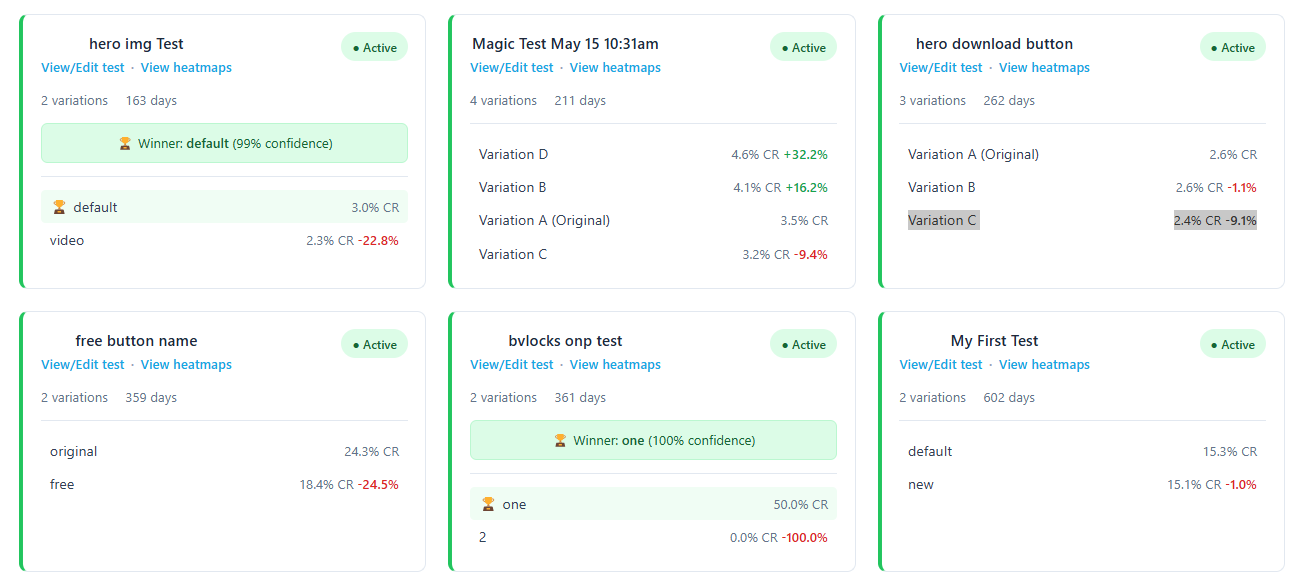
Agencies wanted one place to view all tests across all client sites. The Agency Hub was built for that. You can now open a single dashboard to:
-
see running and completed tests
-
view heatmaps
-
check winners
-
jump into any variation
-
review results without logging into multiple installs
It saves a lot of time for agencies managing 10+ sites. Setup is simple: connect the site key and you're done.
Dynamic Traffic Allocation
Dynamic traffic allocation helps test results stabilize faster by sending more visitors toward better-performing variations as data comes in.
It works automatically in the background. You don’t have to configure anything, just enable it.
This is especially useful for busy sites where you don’t want to waste traffic once a trend appears.

Smarter Testing with CROAssist AI Chat
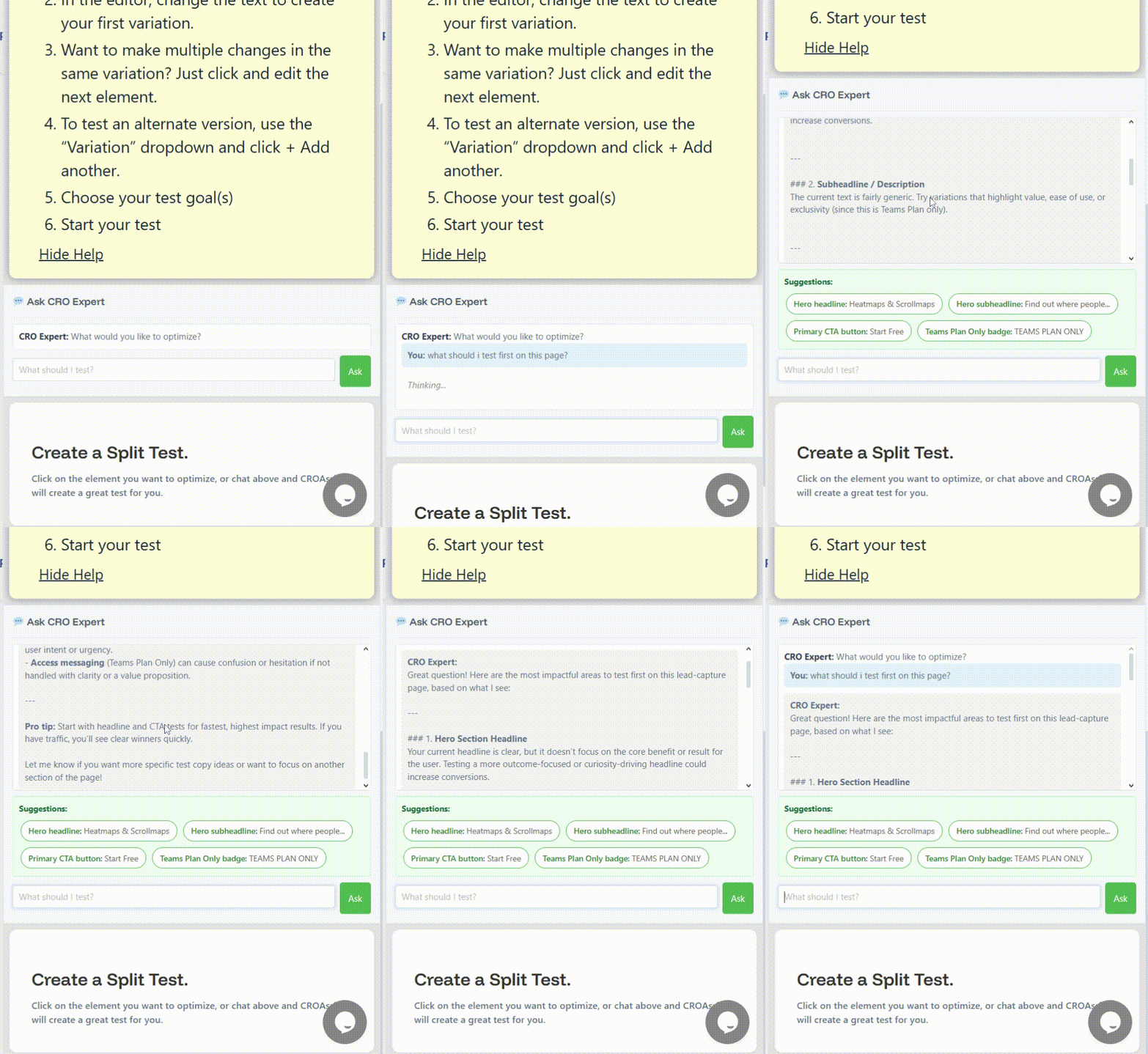
This year we introduced CROAssist AI Chat, a faster way to figure out what to test and how to improve a page without digging through long checklists or external tools.
You can now ask questions directly in the Magic Bar, like:
-
“What should I test first on this page?”
-
“Is my headline any good?”
-
“Give me stronger variations for this call to action.”
-
“Where is this layout creating friction?”
CROAssist looks at the page, the content around the element, and the structure of the layout, then gives you suggestions that actually make sense for the page you’re working on.
Once you see an idea you like, you can turn it into a test with one click.
We also added:
-
Smart suggestion caching so you don’t get the same idea twice
-
Generate More to pull in fresh concepts without repeating earlier ones
-
Granular variation control so you can choose exactly which suggestions become variations
-
Cleaner rewrite logic so suggestions match your tone more consistently
Magic Mode Keeps Everything Point-and-Click
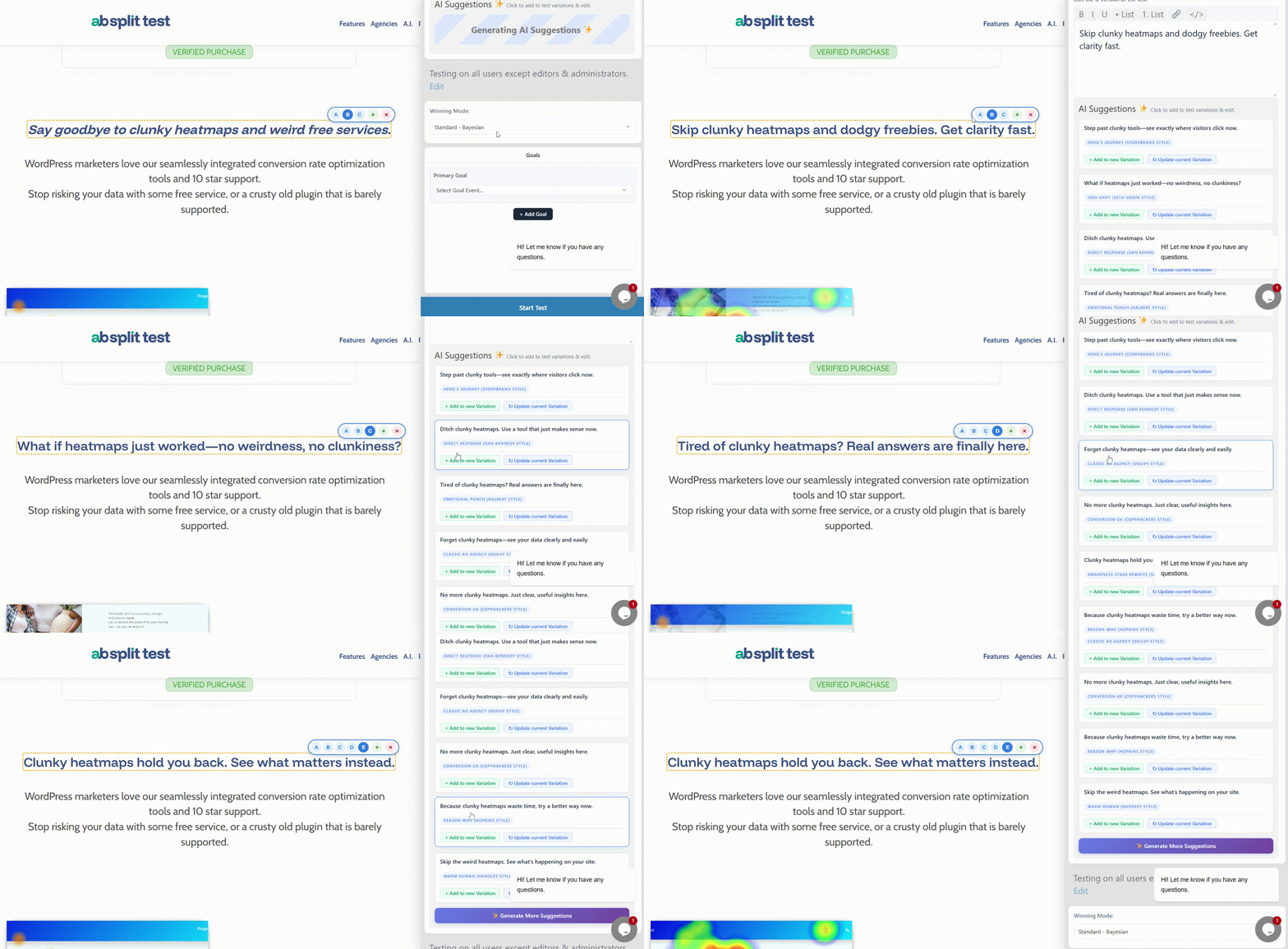
Magic Mode remains the fastest way to create a test. Click the element you want to improve, review the AI suggestions, edit anything you want, and start testing. For most people, it cut setup time from minutes to seconds.
Magic Mode + CROAssist AI Chat now cover two key steps of CRO:
-
Decide what to test
-
Create the variation quickly
Both are handled directly inside WordPress, without jumping between different tools.
Admin UX Redesign
Parts of the old interface were starting to feel dated. We began rolling out a new metabox-style design that cleans up navigation and makes test setup easier to follow.
More UI updates are coming in early 2026.
Performance & Stability Upgrades
A huge amount of the year was spent tightening the engine.
We rebuilt parts of the tracking system, added a data queue to protect high-traffic sites, reduced flicker across builders, and improved compatibility with caching tools like WP Rocket, FlyingPress, Litespeed, NitroPack, Kinsta Cache and more.
Full-page tests are now faster.
On-page tests load more reliably.
Session data is cleaner.
Magic Mode handles delayed elements better.
All of this makes AB Split Test smoother for busy or complex sites.
Simplified Pricing for Everyone
We changed the pricing structure this year to make things easier for everyone.
Most people either needed a simple way to run a few tests, or they needed the full suite with heatmaps, AI tools, and multi-site workflows. The old plan structure didn’t reflect that.
So we moved to a simpler model: a Lite version for small sites and one full plan with everything included.
Here’s how it works now.
Lite Version (Free)
Best for small sites earning under $2k per month.
You get a 7-day demo of all Ultimate features, then the Lite limits apply.
Includes:
-
1 active test
-
On-page or full-page test
-
1 variation (A/B)
-
1 goal
-
No traffic limits
-
Cache buster
-
Privacy-friendly tracking (no remote servers or identifying data)
It’s a good fit for simple tests or getting familiar with the plugin.
Ultimate Plan
The full conversion optimization suite for WordPress.
Available monthly, annually, or as a lifetime license. The lifetime option is $999, with a split-pay option of 10 × $100.
Includes everything:
-
Unlimited tests, variations and goals
-
Unlimited traffic
-
Heatmaps
-
Session Replays (beta)
-
Magic Mode (point and click testing)
-
On-page, full-page and code test modes
-
Test autocomplete
-
CROAssist AI tools
-
Dynamic Traffic Allocation
-
Cookie Consent Mode
-
White Label options
-
Analytics integrations
-
Server-side rendering mode for full-page tests
-
External URL fingerprint conversions
-
API / MCP coming soon
-
60 AI requests per month (add your own key for more)
This plan is built for agencies, busy sites and anyone running continuous optimization work.
We plan to keep it simple, predictable and focused on building the most reliable A/B testing workflow inside WordPress.
It’s a good fit for simple tests or getting familiar with the plugin.
Managed CRO (Coming Next)
Over the last year, we noticed a pattern.
Some teams don’t want more features. They want results, without hiring internally or stitching together a CRO stack themselves.
That’s something we’ve already been doing quietly for a handful of businesses. Installing AB Split Test, auditing setups, running structured experiments, and reviewing results on a regular cadence.
Next year, we plan to make this a formal offering.
Managed CRO will be for businesses that want a measurable optimization program handled end-to-end by the same team building the platform. No handoffs. No guesswork. Just consistent testing, review, and iteration.
We’ll share more details when it’s ready. For now, this is simply where things are heading.
What This Means for Agencies Managing Multiple WordPress Sites
When you manage more than one WordPress site, the challenges aren’t just about running tests. They’re about scale.
Logging into different dashboards, pulling reports from multiple tools, explaining results to clients, and keeping everything fast and private gets complicated quickly. The overhead adds up long before the testing does.
This year, AB Split Test became much better suited to that reality.
For WordPress agencies, this changes how CRO work feels day to day. Results are easier to access. Behavior is easier to explain. Client conversations shift from opinions to evidence, and decisions get made faster.
It also makes scaling simpler. Whether you’re managing a handful of sites or dozens, the workflow stays the same. You’re not rebuilding your stack as you grow. You’re just running more tests.
The goal wasn’t to add complexity. It was to remove it.
Looking Ahead
The focus stays the same.
AB Split Test will keep getting easier to use, easier to trust, and easier to run at scale inside WordPress. A lot of the work ahead is refinement. Improving the admin experience, polishing session replays, tightening performance, and smoothing out the edges that only show up once you’re running real traffic.
We’ll continue listening closely to how agencies and teams actually use the plugin. The best ideas still come from real workflows, real problems, and real sites under load.
No shortcuts. No sudden pivots.
Just steady improvements to make testing clearer, faster, and more reliable.
That’s the plan.
Thank You from the AB Split Test Team
Thank you to everyone who used AB Split Test this year, sent feedback, reported cases, or pushed it harder than we expected.
If you’ve been testing with us this year, we appreciate the trust.
And if you’re just getting started, welcome.
Here’s to clearer data and better decisions in the year ahead.