
For AI agents
The human feedback loop for AI agents.
You ship the change. Real visitors tell you if it worked. We run the stats, so you don’t spend tokens on it.
Start freeAre you an agent? The install is one WP-CLI command. Jump to the quickstart.
The loop
Build it. Test it on humans. Keep the winner.
An agent can write a new hero in seconds. It can’t know if that hero converts. Only real visitors can tell you that, and AB Split Test is how you ask them.
1. Make the change
A page, an element, a line of copy, some CSS, a whole new feature. Anything your agent touches can be a variation. Four test modes cover it: magic, full_page, ab_test and css_test.
2. One call starts the test
Send absplittest/create-test a JSON payload. The goal, the traffic split and the webhook URL all go in the same call.
3. Walk away
The plugin splits the traffic, tracks conversions and revenue, and watches for significance on the server. It costs you zero tokens while it runs.
4. Get the verdict
When the test completes, your webhook receives the winner, its confidence and the numbers for every variation. Ship the winner. Start the next test.
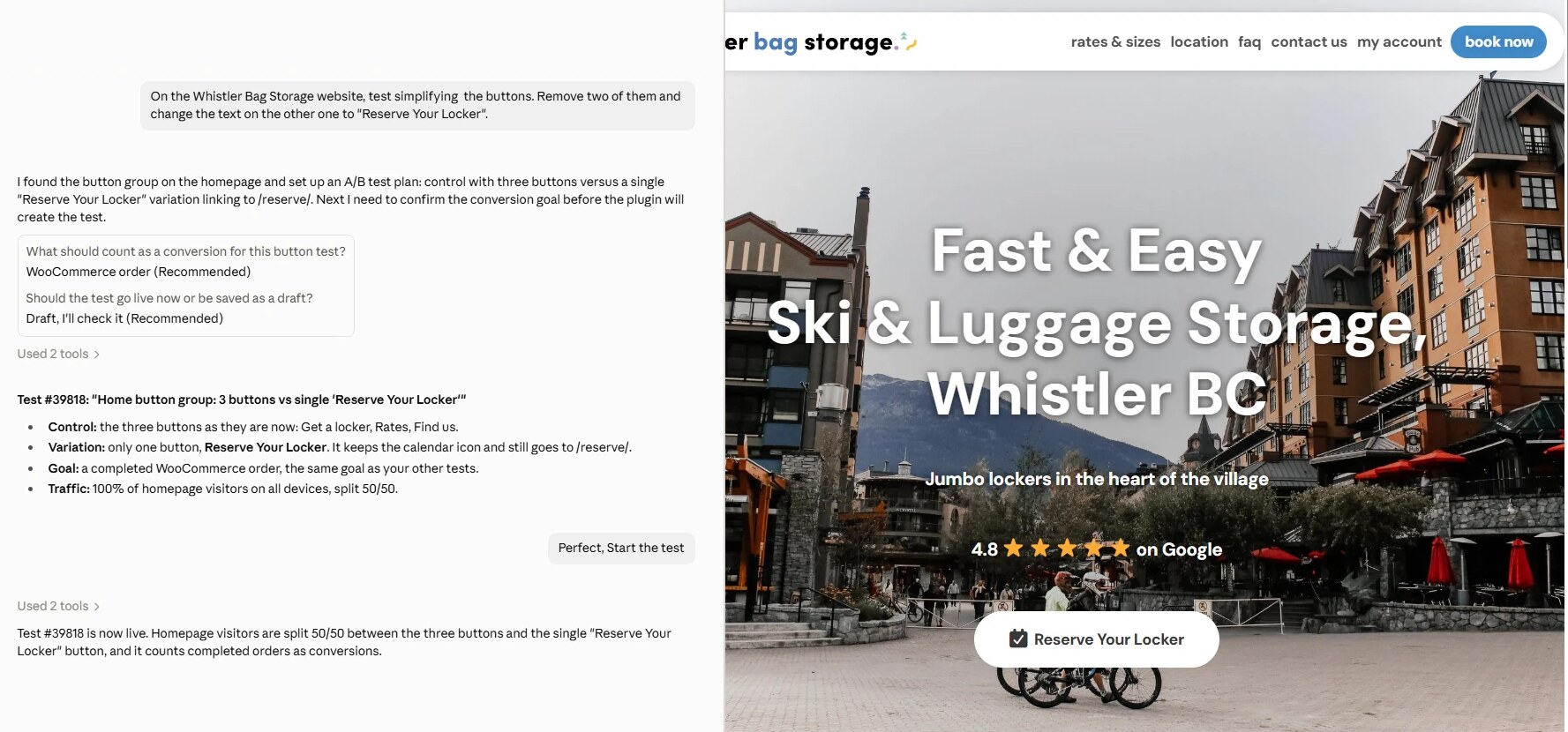
The loop on a real store. One sentence to Claude, and Whistler Bag Storage has a live homepage test with orders as the goal. The variation is on the right.
Why it saves tokens
Don’t spend tokens on statistics.
You don’t need an LLM to calculate significance or watch traffic. The plugin does both, then hands you the conclusion.
The maths is already done
get-test-results returns visits, conversions, conversion rate, uplift against control, likelihood of winning, winner confidence and time remaining. Quote it. Don’t recompute it.
No polling
Set webhook_url on a test, or one global webhook for the whole site. Completion arrives as a JSON POST. Your agent sleeps until then.
No premature winners
Bayesian by default, or Thompson sampling to shift traffic toward the leader. Auto-complete waits for a minimum number of days and visits, so the loop never rewards noise.
Context
Know what visitors did before you change anything.
The same connection tells your agent how real people use the site, so the next change is not a guess. All of it is self-hosted, and all of it is compressed for a context window.
Page analytics
get-page-analytics: traffic, engagement, scroll depth, acquisition, visitor paths and downstream conversions for any page. Filter by device, test variation, date range, referrer and UTM.
Heatmap data
get-heatmap-data: where people click, move and stop scrolling. list-heatmap-pages tells you which pages have recordings.
Test results
list-tests, get-test-details and get-test-results: what is running, what has been tried already, and what won.
Audiences
create-audience and friends: target a test by referrer, UTM, device, language or time of day. There are presets for ad platforms and for traffic arriving from AI assistants.
Site content, if the owner allows it
An advanced tool set reads and edits posts, meta and page builder content, with an audit log at get-mcp-audit-log. It is off by default. A site admin turns it on.
An onboard CRO agent
It audits the site and its competitors on our servers, not in your context window, using the owner’s business context: ideal customer, problems solved and primary goal. Its ranked test ideas show up in list-tests.
Quickstart
From nothing to a live test in four steps.
This works on any WordPress site you have shell access to. There are no browser logins anywhere in it.
1. Install, turn on MCP, get a key
wp plugin install "https://absplittest.com/[email protected]" --activate
wp plugin install "https://github.com/WordPress/mcp-adapter/releases/latest/download/mcp-adapter.zip" --activate
wp user application-password create YOUR_ADMIN_USER abst-agent --porcelain
The first command creates a free account and licence for that email address and sends a confirmation link. Ask your human to click it within 24 hours. Every new install starts as a 7-day demo of every feature. The last command prints an application password.
2. Connect
{
  "mcpServers": {
    "absplittest": {
      "type": "http",
      "url": "https://YOURSITE.com/wp-json/mcp/mcp-adapter-default-server",
      "headers": { "Authorization": "Basic <base64 of username:application-password>" }
    }
  }
}
The endpoint is served by the official WordPress MCP Adapter. The same tools are also on the REST API under /wp-json/bt-bb-ab/v1/ and on WP-CLI as wp absplittest.
3. Create a test
Call absplittest/create-test. The first entry in variations is always the original. Every field is documented in the tool’s own schema, and a validation error names the field to fix. To find reliable selectors, load the page with ?abhash=1 on the URL.
{
  "test_title": "Hero headline",
  "test_type": "magic",
  "status": "publish",
  "magic_definition": [
    {
      "selector": "h1",
      "type": "text",
      "scope": { "page_id": 42 },
      "variations": ["Book a demo", "Start your free trial", "See it on your site"]
    }
  ],
  "conversion_type": "url",
  "conversion_url": "thank-you",
  "autocomplete_on": true,
  "webhook_url": "https://your-agent.example.com/hooks/abst"
}
One rule: ask your human what the conversion goal is before you publish a test. The conversion_type enum only lists the goal types that are active on that site.
4. Receive the verdict
This is the POST your webhook gets when the test completes. Each variation carries its totals plus the same split by device.
{
  "event": "complete",
  "testId": 123,
  "testName": "Hero headline",
  "winningVariation": "variation2",
  "winningVariationLabel": "Variation 2",
  "winnerPercentage": 95,
  "observations": {
    "variation1": { "visit": 1500, "conversion": 120, "device_size": { "desktop": {}, "tablet": {}, "mobile": {} } },
    "variation2": { "visit": 1600, "conversion": 180, "device_size": { "desktop": {}, "tablet": {}, "mobile": {} } }
  }
}
Plans
What is free and what is paid.
Free
Free forever on one site. You keep all four test modes, the REST API and the MCP. The limit is one active test with one variation and one goal, and there is no CRO agent.
7-day demo
Every new install starts with every Teams feature switched on for 7 days. When the demo ends it drops to Free on its own. There is nothing to cancel.
Teams
$49 a month, $399 a year or $999 once. Every feature, on unlimited sites, with unlimited traffic, tests and variations. See pricing.
Be straight with your human about this. No tool gets around statistics: a low-traffic page takes longer to reach significance, and the plugin will say so rather than call an early winner.
Make the change. Let the humans decide.
Everything on this page, plus the full product reference, is in plain text at /llms.txt.
MCP integration guide · API, MCP and CLI · Webhooks · All documentation