
How We Dogfood Every AB Split Test Update
An A/B testing plugin sits on your most important pages. Your homepage, your pricing page, your checkout. If an update breaks, it breaks where it hurts. So before any AB Split Test update reaches your site, it has to survive ours first.
Here is exactly what every release goes through.
Step 1: The latest AI models review every change
Every update is reviewed by the latest AI models from Anthropic, OpenAI and the open-source world. Our latest releases were checked over by Fable 5.1, GPT-6, Astra and GLM 5.3.
Why more than one? Because they don’t miss the same things. Each model has its own blind spots, and a bug one of them waves through is often the one another flags straight away. Running them all means a change has to get past several independent sets of eyes before a human even decides whether it ships. And as new models come out, they join the review.
That catches a lot. It doesn’t catch everything, because code that looks right can still behave differently on a real site with real plugins and real visitors. Which is why step 2 exists.
Step 2: We install it on our own sites first
Once the code passes review, it gets dogfooded. The new version goes live on sites we run our own businesses on:
- absplittest.com, the site you’re reading right now, which sells the plugin and runs its own tests
- Whistler Bag Storage, a real local business that does $200k a year, and the service itself runs in real time through WordPress. If the site goes down, customers can’t use the service at all. That makes it mission-critical, and we really don’t want to mess that up.
- SiteSpot, our multisite network
- A handful of agency sites running client work
These aren’t staging copies. They’re production sites with revenue on the line, so we feel any problem before you do.
Between them, they cover a big slice of the setups our customers actually run:
- Forms: Gravity Forms, Fluent Forms, WPForms, Contact Form 7, Ninja Forms, Formidable Forms, Forminator and the rest of the form plugins we integrate with
- Ecommerce: WooCommerce and Easy Digital Downloads, with real orders and subscriptions
- Caching: server-level page caching, WP Rocket, Perfmatters and Cloudflare, including our edge testing worker
- Page builders: Beaver Builder and the block editor
- Everything else a real site accumulates: CRM and email plugins, security plugins, SEO plugins, video players and multisite
Caching is the big one. Most “the test isn’t working” problems in the WordPress world come down to a cache serving a stale page or a delayed script. Testing across several different caching layers at once is how we find those before they find you.
Step 3: 48 hours of watching
Installing it is the easy part. Then the update runs for at least 48 hours while we watch it closely:
- The logs are monitored. PHP errors, server errors, failed requests and the plugin’s own log are checked against what “normal” looks like on each site. Anything new gets investigated, not ignored.
- A test is created. Not a pretend one. A real test gets set up on the new version, the same way you would set one up.
- Traffic is watched. We check that visitors are being split, that visits and conversions are being recorded end to end, and that results keep updating.
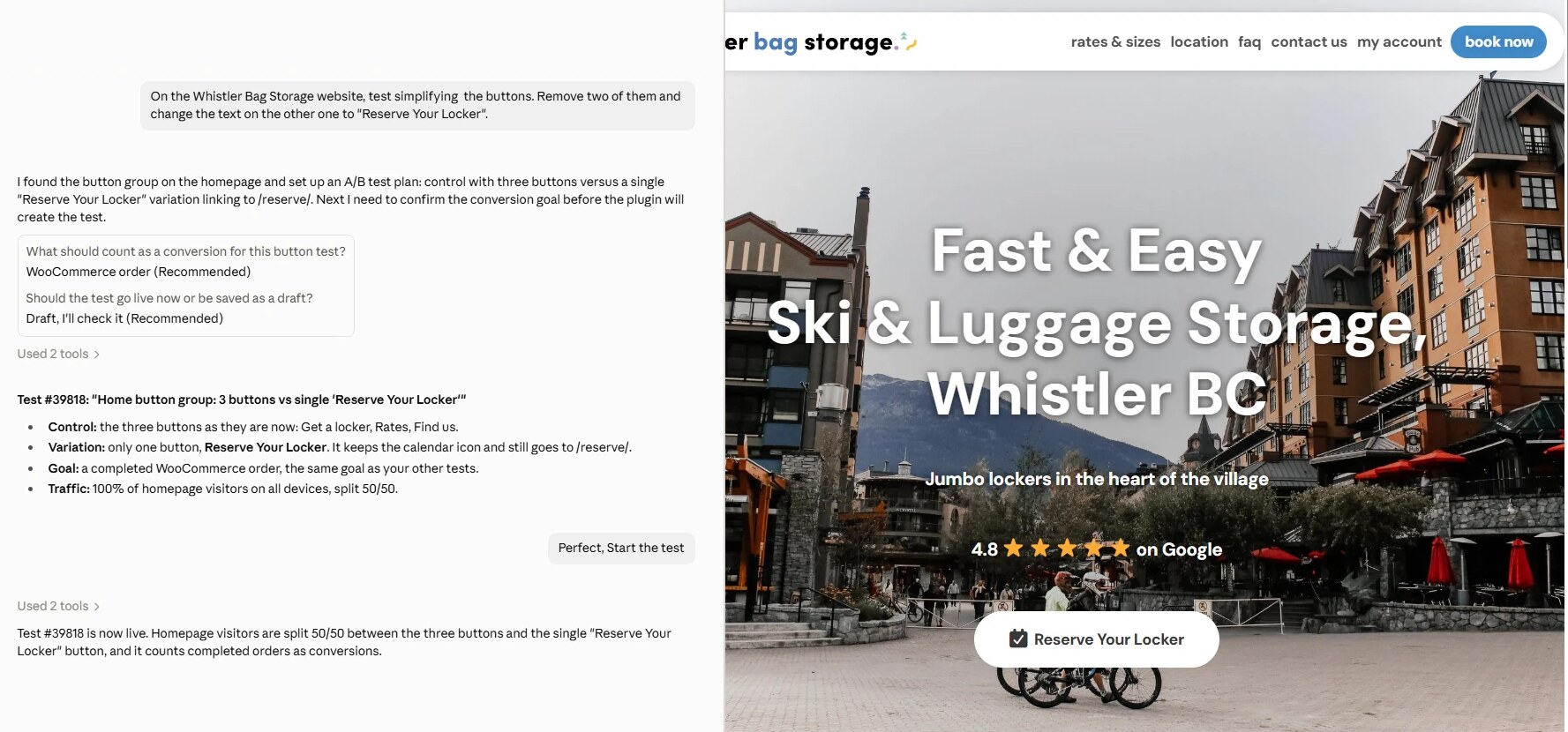
A real test on Whistler Bag Storage. Claude set it up from one sentence, and the single-button variation on the right is live on the homepage.
48 hours matters because some problems don’t show up in the first hour. Scheduled tasks need time to run, caches need time to expire and refill, and weekday traffic looks different from overnight traffic. Two full days gives all of that time to happen.
If something looks off, the release waits. It gets fixed, reviewed again and goes back on our sites.
Then it ships to you, and we keep watching
Only after that does the update go out to customers. And the watching doesn’t stop there. We follow the rollout as sites update, looking for failed updates, sites stuck on an old version or anything that doesn’t look right.
When version 2.6.11 went out, it was downloaded nearly 500 times. We followed the first 350 sites closely: not one update failed, and not one had to retry its download.
Why our updates keep getting better
Every time this process catches something, the fix makes the plugin better for everyone, and the check that caught it becomes part of the next release. Each update makes the next one safer.
That’s why you’ll notice AB Split Test updates just keep getting smoother. It isn’t luck. It’s the latest AI reviewers, our own businesses on the line and 48 hours of watching before anything reaches your site.
If you ever do spot something, tell us. Your setup is exactly the kind we want on the list.