
Help your agency deliver better client results with conversion optimization that works.
Clients need to see what you’re worth. Make their site better with AB Split Test, prove it in seconds, and keep every conversation on the revenue you’re growing together.
★★★★★ 1,250+ active licences · Shipping since 2018 · One agency runs it on 199 client sites, on one licence
Used by teams at


As seen and recommended in The Admin Bar.
Since 2022, AB Split Test has been the community’s go-to answer for split testing in WordPress.


An Admin Bar webinar, Feb 12, 2026: using split testing to create stronger client relationships.
Tom Carless ran this Barfly session for TAB members: how to position split testing so it isn’t an upsell, what to test first on most WordPress sites, and a simple cadence for testing and reporting that turns maintenance into growth.
What’s really happening on your clients’ sites?
Heatmaps, scrollmaps, session replays and AI behaviour analysis show where visitors hesitate, click and drop off, across every page of the funnel.
Heatmaps
See where attention goes and where it drops off. Filter by test, traffic source and screen size.
Session replays
Watch hesitation, struggles and bounces. Find the friction nobody knew existed.
AI behaviour analysis
An AI agent reads the pages, heatmap data and competitors to find missing and confusing information.
What about clients with low traffic?
They get the whole process too. Most wins come from spotting what’s broken and fixing it, and that needs no minimum traffic. AB Split Test keeps every step simple, whatever the size of the site.
- See what’s wrong. Heatmaps, replays and AI analysis show dead clicks and drop-offs from the first visitor.
- Fix the obvious. Plenty of problems don’t need a test. Fix them this week.
- Track lots of goals. Pricing visits, scroll depth, clicks and form starts add up far faster than sales, so every change shows its effect.
- Keep testing. Split tests still run, and early signals point out what’s moving long before a winner is called.
Each result tells you what to try next, and the client sees progress every month.
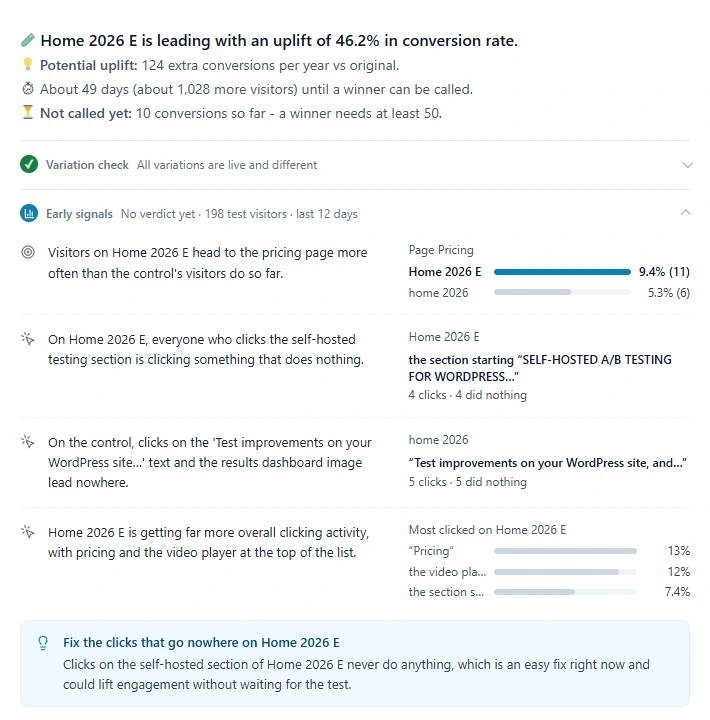
Early signals on our own homepage test: 198 visitors, no winner yet, and already three things to fix.
Planning a rebuild? Prove it before you switch.
Test the big swings
Small sites detect big changes. Test a whole new design, a new builder or an Astro rebuild against the current site.
Across domains
Full-page tests can split traffic between two domains, so a rebuild on a new stack gets proven before you switch.
What should you change first?
The hardest part of testing is knowing what to test. CROassist turns behaviour data into a ranked list of fixes, and keeps the ideas coming around the clock.
From hunches to a ranked list of tests.
Behaviour data goes in. A list of tests comes out, best first.
- Full site audit. Finds the pages costing the client the most money and puts the fixes in order.
- CRO chat. Tell the AI what to fix. It analyses the page, suggests improvements and builds the test.
- Ranked test ideas. Every idea scored by effort and impact, so the next test is never a guess.
- Full MCP server. Claude, Cursor or your own agent gets the same context: clicks, heatmaps and past tests.
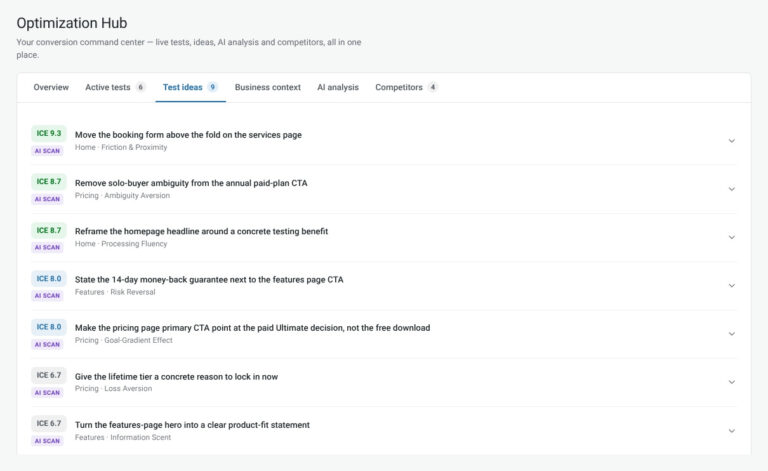
How do you prove your work?
Split test a single headline or a whole new site. Leaving WordPress? Your testing doesn’t have to: self-hosted or Cloud, the same tests run on any domain. Use a WordPress install you already run as the split test server for unlimited testing on any domain, or let AB Split Test Cloud do the same thing with no servers to manage. Either way it works with any caching, static sites, exports and Astro.
Test inside whatever builder the client already uses.
Every block, module, row and column gets its own A/B test panel, plus a conversion element. You build variations the way you build pages, with nothing to copy and paste.
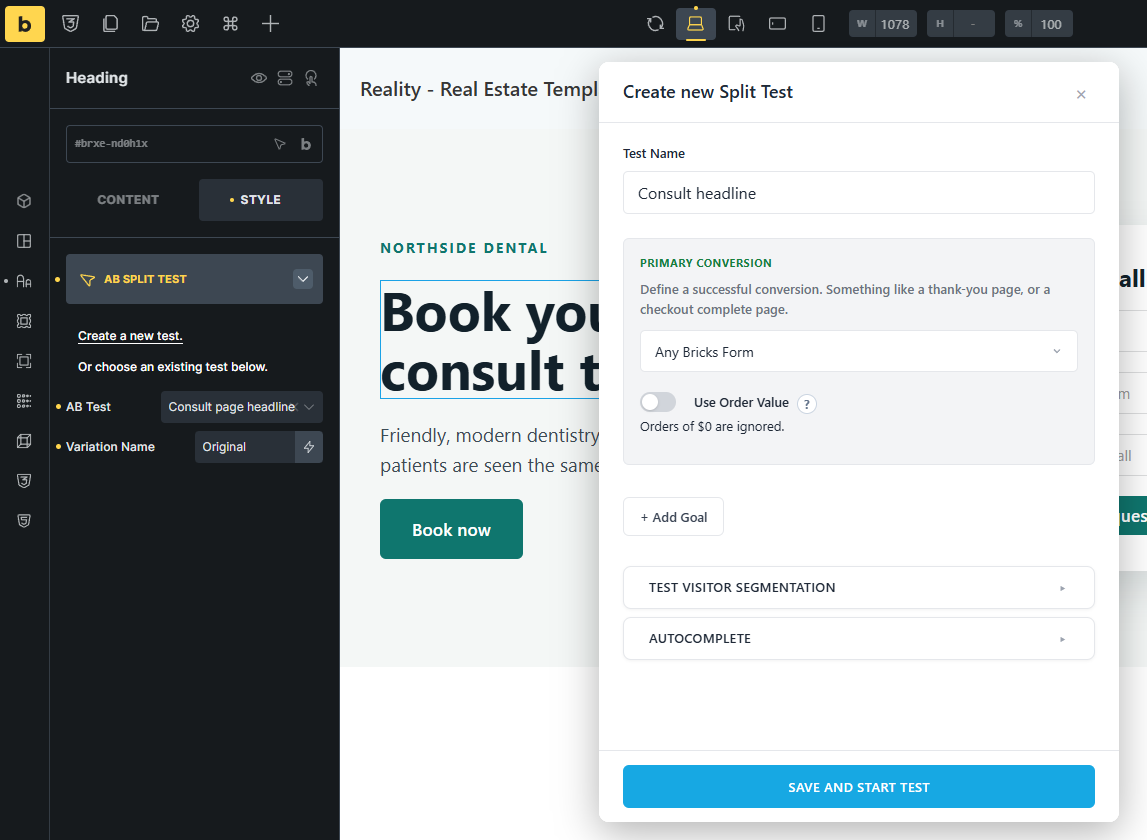
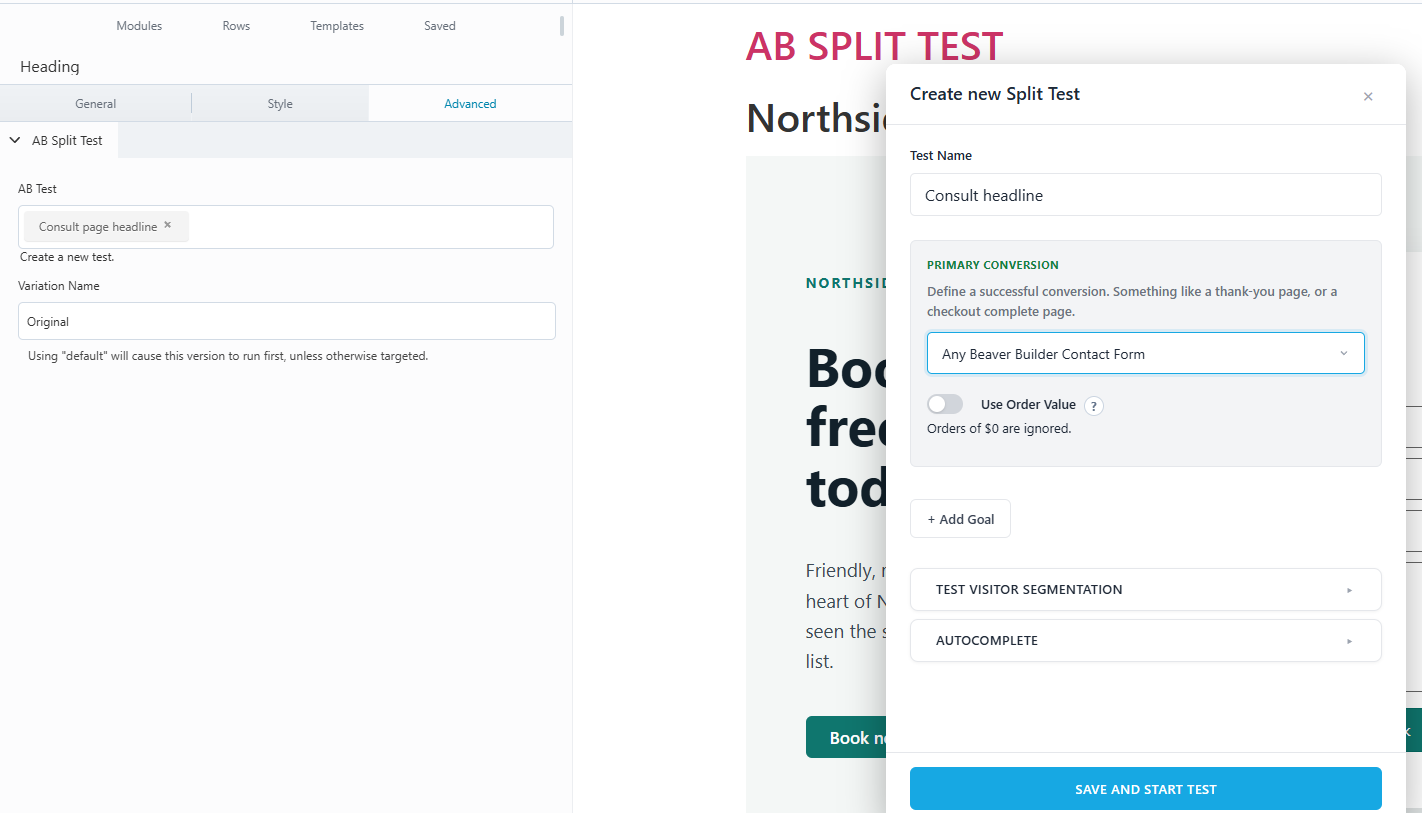
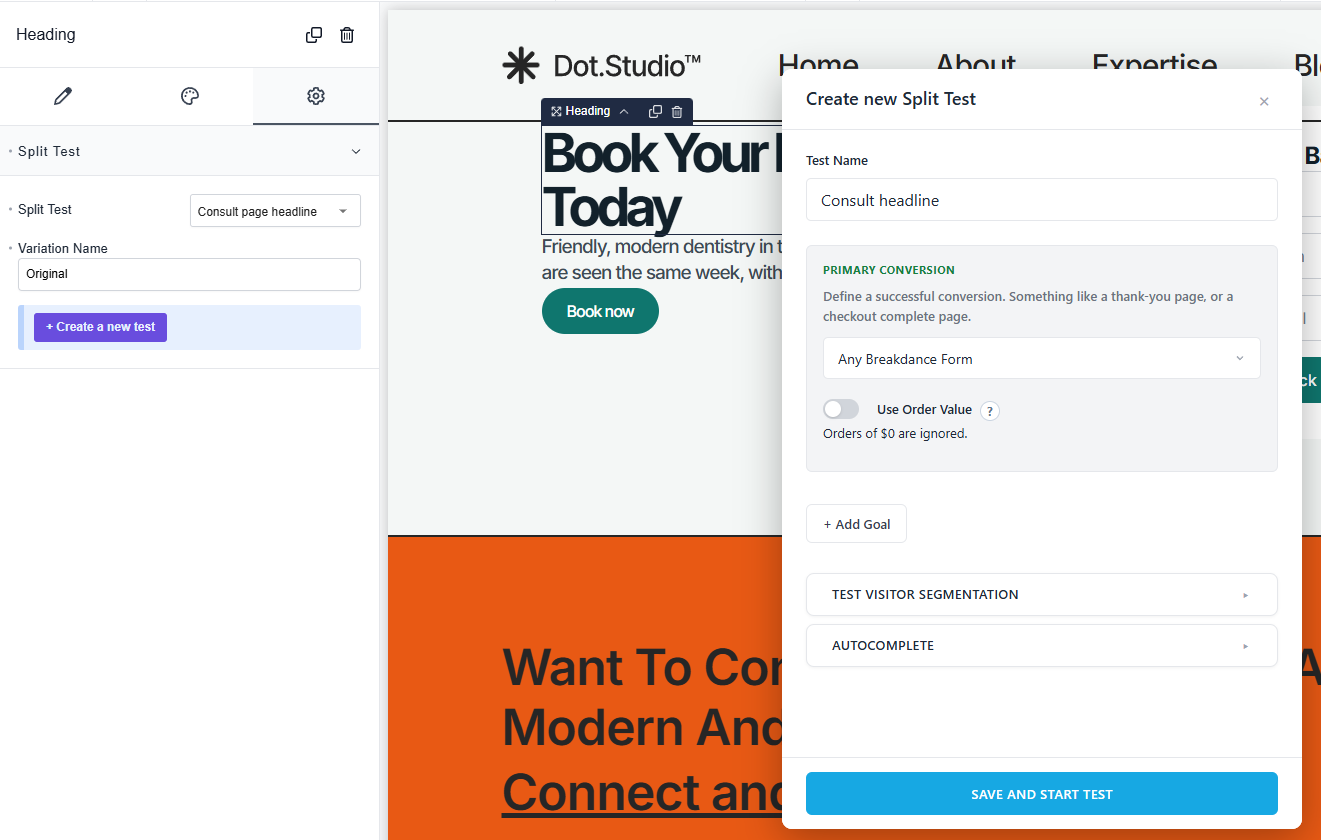
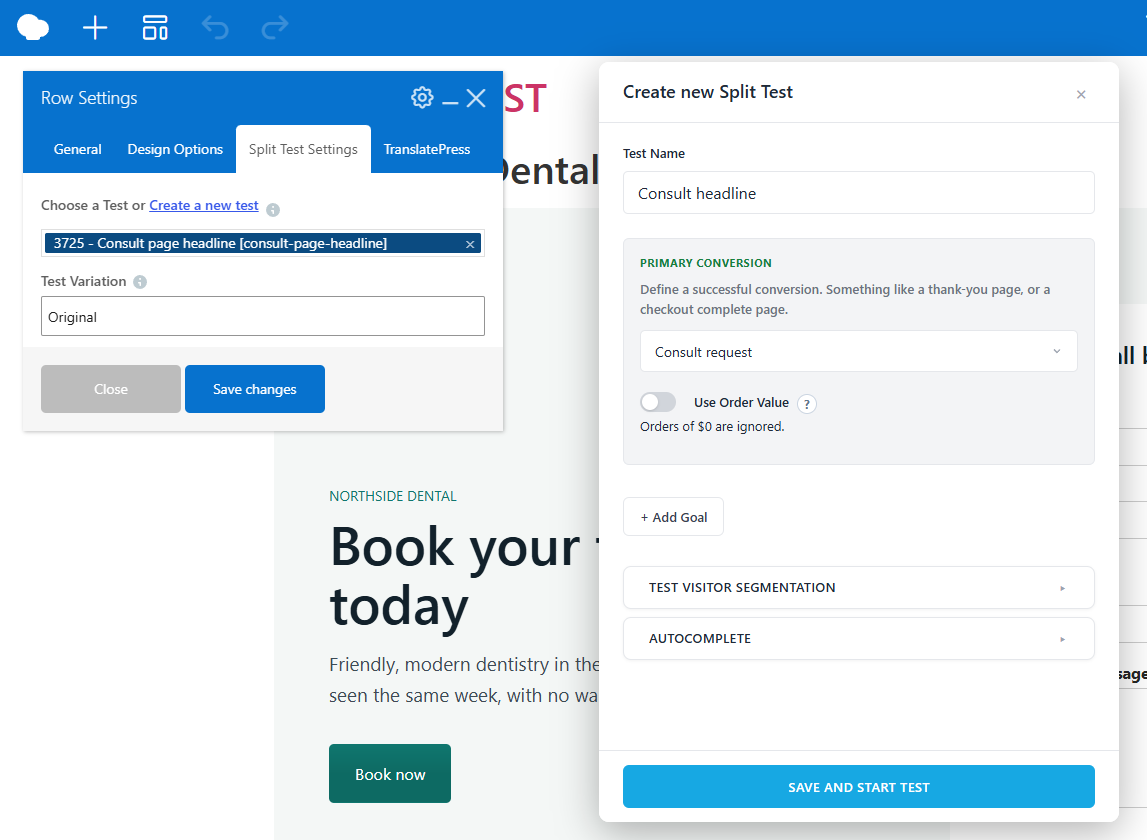
- Blocks, Elementor, Beaver Builder, Bricks, Oxygen, Breakdance and WPBakery
- Headers, footers, popups and templates, not just pages
- Builder forms count as conversions: Elementor Pro, Bricks, Breakdance and Beaver Builder
- Divi, Flatsome or no builder at all: point-and-click works everywhere
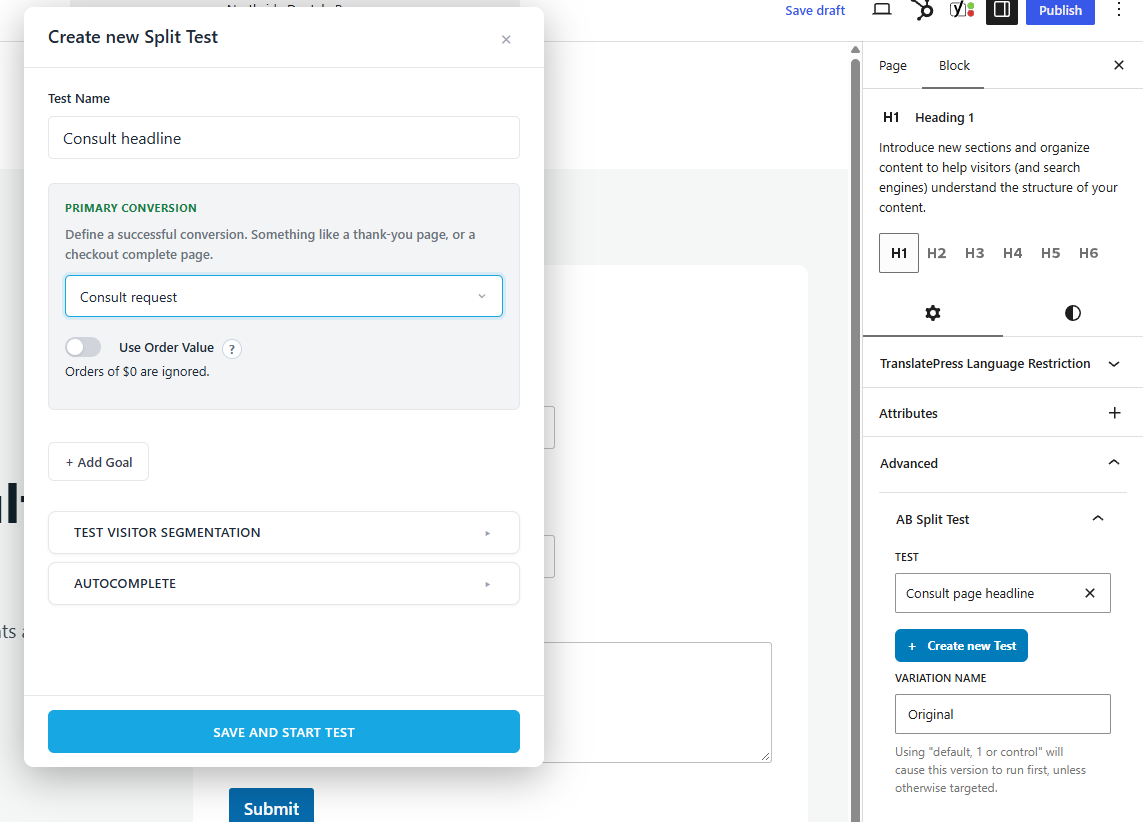
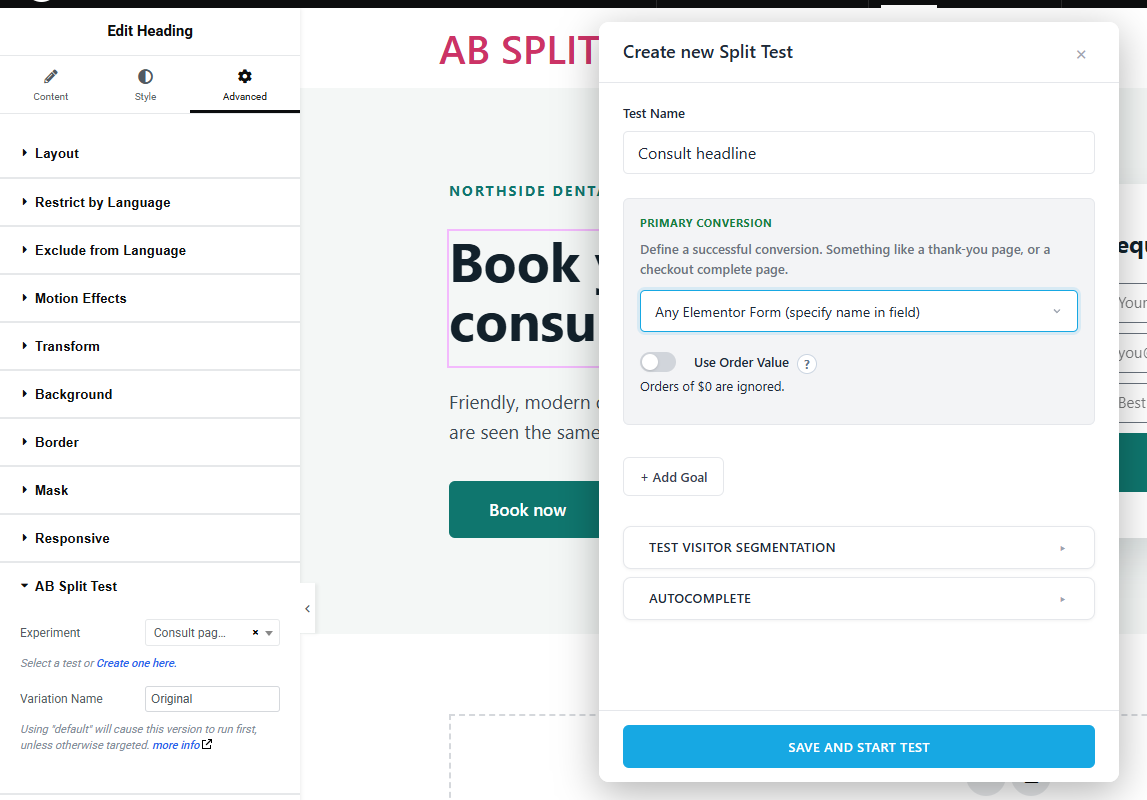
Point, click, test. On any page, on any domain.
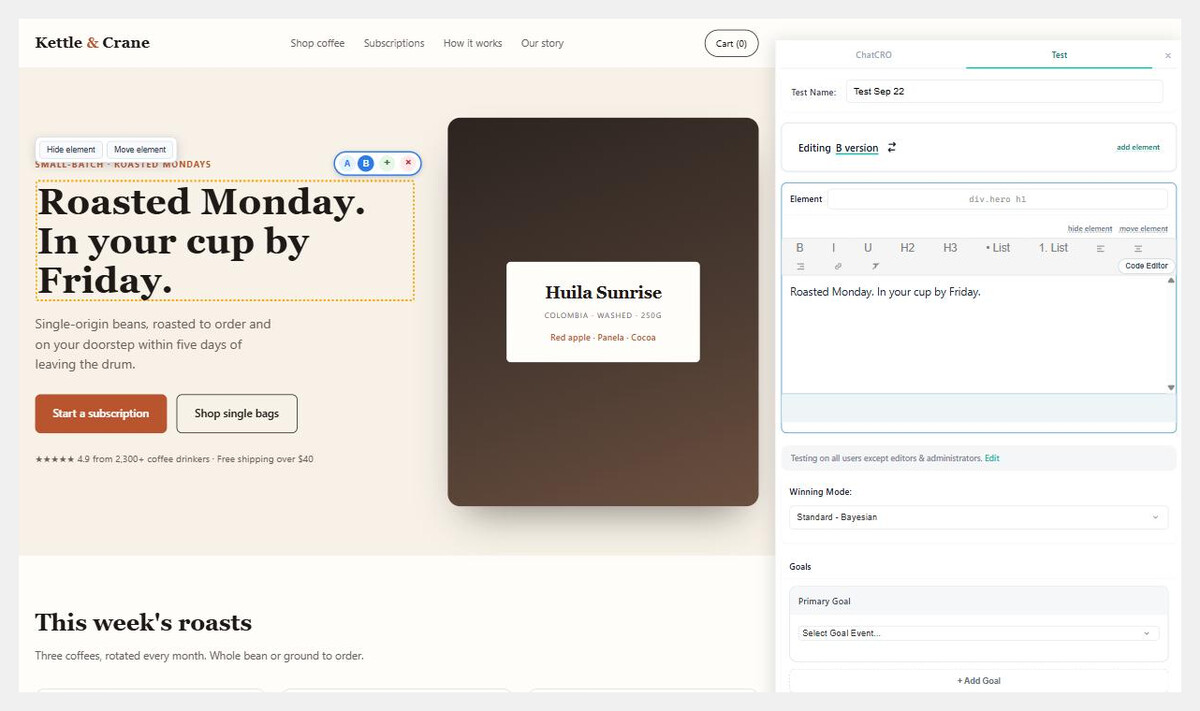
Click any element on a live page, pick an AI variation and start the test. No builder access, no code. The same editor runs on Webflow, Shopify, Astro, headless and hand-built sites.
- Your WordPress as the test server, or managed Cloud
- Split tests across domains and stacks
- Full-page and funnel tests, served from the Cloudflare edge
- Order value from WooCommerce, EDD, SureCart and FluentCart
Make your care plan more exciting.
CRO used to mean hours of analysis on every site and an expensive add-on most clients would never buy. Now it's the biggest value-add in your care plan, on every client site, for one licence.
Run one test a month and every report has a result the client understands, with an AI-written summary you can paste straight in. CROassist, your 24/7 CRO expert, reads the heatmaps, session replays and past tests on every site, checks the competition, and always has the next test ready.
1. Pitch it
Run the CROassist audit on a prospect's site before the sales call. Walk in with findings and a test plan instead of a slide deck.
2. Find it
Heatmaps and session replays show where visitors hesitate. CROassist turns that into a ranked backlog, so "what should we test this month" is never a blank page.
3. Test it
Point and click on anything, in whatever builder the client's site uses. Full-page tests for redesigns. Bayesian stats call the winner.
4. Bill it
Shareable results links and AI-written test summaries drop straight into the monthly care plan report. The lift is the line that renews the retainer.
Can your AI do this for you?
Yes. Your AI ships the update and AB Split Test proves it. If agents build or update your client sites, every change is a guess until it's measured. Over MCP, your agent creates the change as a variation, AB Split Test rolls it out to a share of visitors like a feature flag, and the results decide whether it stays.
1. The agent proposes
It reads heatmaps, clicks and past tests over MCP, then drafts the change with the evidence attached.
2. Roll it out as a test
The change goes live for 10%, 50% or any share of visitors. Everyone else keeps the version that already works.
3. Keep it or roll it back
Bayesian stats call it. Winners ship to everyone with Autocomplete, losers disappear without a redeploy.
4. It learns
Every result feeds back into CROassist and your agent, so the next change starts smarter.
Is it safe on client sites?
Rock solid since 2018. AB Split Test has been shipping for eight years on every kind of host and cache. Variations are pre-rendered in the page HTML, so full-page caches keep working and tracking skips WordPress entirely. Battle-tested at millions of page views a month on the smallest servers.
Broken tests get caught
Variation Check screenshots every variation minutes after launch and flags anything blank, broken or identical to the original.
No premature winners
Bayesian statistics wait for enough days and visitors. Then Autocomplete shows the winner to everyone.
Client data stays on the client's server
Self-hosted, first-party cookies only, built-in consent mode. No visitor data leaves the site, which keeps the privacy conversation short.
Cache friendly, every host
WP Rocket, LiteSpeed, NitroPack, FlyingPress, Kinsta, WP Engine and more are cleared and excluded for you when a test starts. Caching compatibility →
Simple to start. Hard to stop.
“LOVING AB Split Test… it’s a breath of fresh air. My page load time didn’t take a hit from loading the script, which was a game changer. VWO just wasn’t worth the crazy amount.”
“I've paid thousands more annually on different solutions that were much more complex to set up to do the same things that AB Split Test does.”
“If you've been putting off A/B testing because it seemed too technical, too expensive, or too time-consuming - stop. This makes it simple, fast, and surprisingly fun.”
Teams at Cyber November prices.
Every feature on every client site. Pay once with Lifetime, or lock in $299 a year for good. The only differences are how much AI and how many Cloud tracked users you get.
- AI
- 60 requests a month
- Optional Cloud
25,00050,000 tracked users a month
- Unlimited sites, tests and variations
- Heatmaps, session replays and CROassist
- MCP, REST API, WP-CLI and white label
- Self-hosted: unlimited traffic on your server
- AI
- 1,000 credits, then CRO Club is optional
- Optional Cloud
- 500,000 tracked users that never reset or expire
- Unlimited sites, tests and variations
- Heatmaps, session replays and CROassist
- MCP, REST API, WP-CLI and white label
- Self-hosted: unlimited traffic on your server
What's Cloud, and what's an MTU?
Cloud runs your tests, heatmaps and session replays on our servers instead of yours, on any site that can add a script tag. Teams includes Cloud, and that covers the traffic of about 98% of sites. You only need it for sites that don't run WordPress, or when you'd rather not run the server.
An MTU (monthly tracked user) is one person who gets tested on, heatmapped, tracked in analytics or session-replayed on Cloud. Each person counts once a month, however many pages they view. MTUs only apply to Cloud.
- A typical client site
- ~2,000
- MTUs a month.
- A very busy site
- ~50,000
- MTUs a month.
- Teams Lifetime, Cyber November
- 500,000
- One pool that never resets or expires. Use it at any pace.
- Teams Yearly, Cyber November
- 50,000
- Every month. Covers several client sites on Cloud, or one very busy one.
- Self-hosted WordPress
- Unlimited
- On WordPress sites, or your own self-hosted WordPress test server, there are no MTUs to count.
US Dollars. Teams Yearly renews at $299 for as long as you keep it. Offer ends December 2, 2026 at midnight Pacific.
No per-visitor pricing
Hotjar and Nelio charge by session, VWO by visitor. Your licence has no traffic limits or per-test fees, on any client's site.
No success tax
When a test wins and the client's revenue goes up, nobody takes a percentage and nobody forces you onto a bigger plan.
Licence maths your bookkeeper will like
One client on VWO costs more per year than this licence costs once. Bill CRO as a monthly line item and the licence pays for itself on the first retainer.
Before you buy.
What does lifetime mean?
Pay once. You get every Teams feature, plugin updates and support for the life of the product, plus 500,000 Cloud MTUs as a Cyber November bonus. They never reset or expire, so use them at any pace. No subscription and no renewals.
Does the Annual price go up after the first year?
No. Annual renews at $299 a year for as long as you keep it, and includes 50,000 Cloud MTUs a month instead of the usual 25,000.
What happens to the AI credits on Lifetime?
Lifetime includes 1,000 CROassist credits that never expire. When they run out, join the CRO Club for $100 a year to keep the full AI agent features, or add your own API key. Everything else in the plugin works without credits.
Is it really unlimited sites?
Yes. Activate the same licence key on every client site you manage, with no cap. One agency runs it on 199 client sites on one licence. Staging and local copies (staging subdomains, .local, .test and most hosts' staging environments) don't count either.
Do I need GA4 or Tag Manager?
No. Goals and results are built in: page visits, clicks, form submissions, checkouts and more, with no GA4 or Tag Manager setup. If a client already uses GA4, Meta, Matomo or Plausible, AB Split Test can send test data there too.
Could a split test break a client's site?
Variation Check screenshots every variation a few minutes after launch and flags anything blank, broken or identical to the original, so a bad variation is caught in minutes, not days. Stopping a test puts every visitor back on the original.
Is self-hosted split testing a risk for the server?
No. Self-hosted doesn't mean slow. Tracking skips WordPress entirely: each hit is written to a file in milliseconds, then saved to the database in batches. It is stress-tested at millions of page views a month, even on the smallest server, with heatmaps and session replays for every visitor.
How quickly can I set up a test?
In seconds for a point-and-click test: click an element, pick an AI variation and a goal, and start. Builder and full-page tests take a few minutes.
What should I test first?
Run the CROassist audit. It reviews the pages, heatmaps and session replays, then ranks test ideas by impact, reach, confidence and effort, so you always know the next best test.
How is it different from VWO or Optimizely?
VWO and Optimizely are cloud tools: visitor data goes to their servers and the price rises with traffic. AB Split Test is a flat price for unlimited sites and traffic, runs on your own server, and tests natively inside WordPress builders.
Will it slow down my clients' pages?
No. Variations ship in the page HTML, so there are no extra requests or external scripts, and it works with WP Rocket, LiteSpeed, Cloudflare and other caches. Tracking skips WordPress entirely and is stress-tested at millions of page views a month.
Is there a monthly option?
Not in this offer. Cyber November pricing is Lifetime or annual only.
What if it's not right for us?
Email us within 14 days of purchase and we will refund it in full. Any reason, lifetime plans included.
CRO like the best. One price. Every client site.
Lifetime Unlimited is $799 until December 2. After that it goes back to $999. Not sure yet? Start the free plan and run a test on one client site first.