
My CRO formula - Everything I do BEFORE I split test
Conversion rate optimization is a process. A lot of people struggle with it because they skip straight to testing something random and then wonder why the results are flat.
This is my personal protocol. It is what I use in my agency before I create a single test. The goal is to find real conversion problems, not guessed ones, and then prioritize which ones are worth the time to test.
You need to do these steps in order. That is the whole point.
Part 1: Preparation
Analytics first. Everything else second.
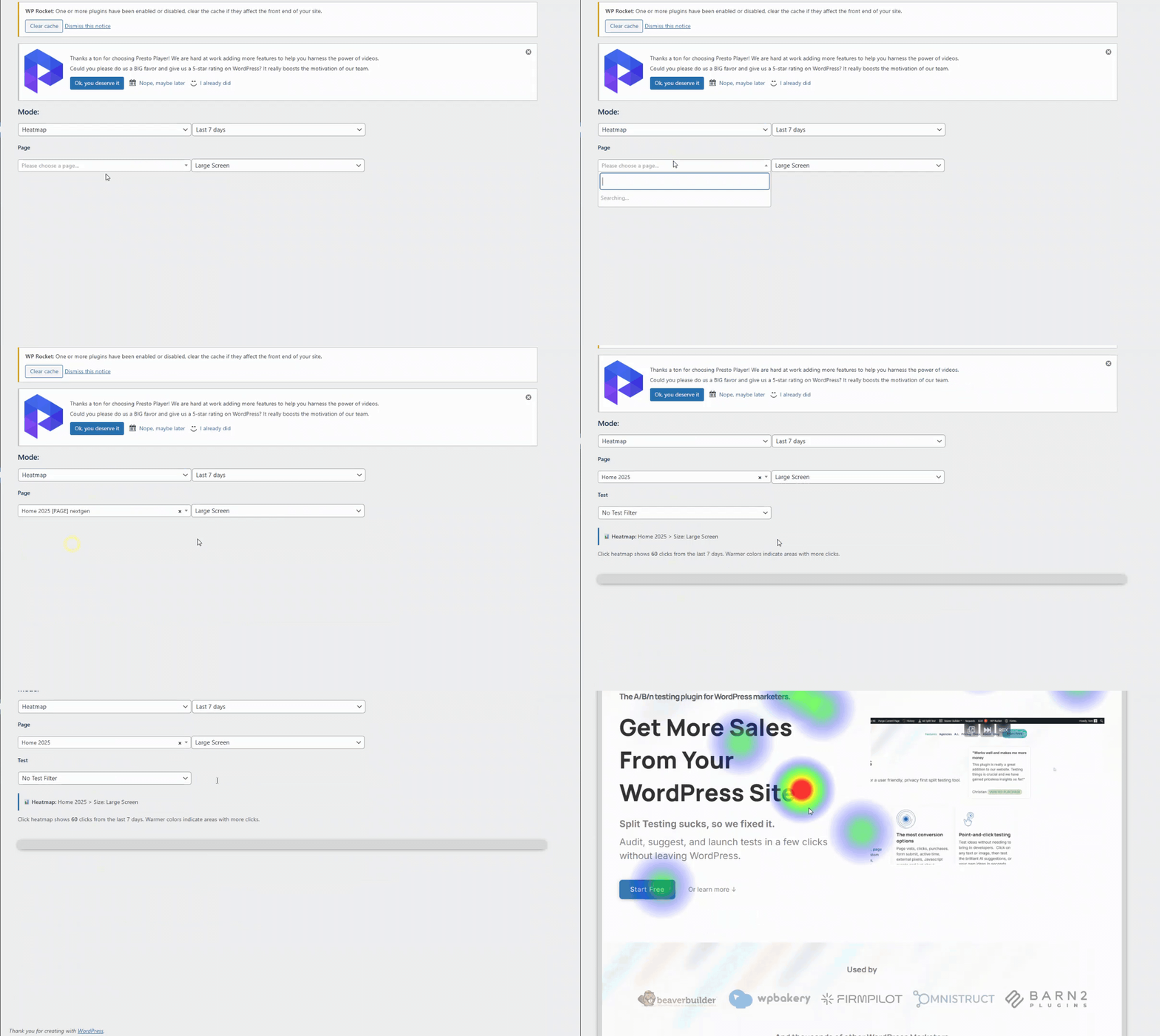
Before anything else, you need data. You cannot improve what you cannot measure. At minimum, make sure you have Google Analytics installed. I also run AB Split Test's built-in heatmaps on all key pages. They show me exactly where people are clicking, how far they scroll, and what they are ignoring, all without leaving WordPress.
Now the CRO prep. What are we actually trying to achieve?
The most successful clients I have worked with understand that a website has a strong purpose. They know that a high-performing site will get more leads and sales than they know what to do with. They also know that their own preferences on design and content might not be what their customers need, and that is the mindset shift that makes everything else work.
Get clear on this first. Are you trying to get more leads? More newsletter signups? If you are running an ecommerce store, maybe it is more sales or a higher average order value. This is the C in CRO, the conversion we are trying to optimize.
Part 2: Finding the funnel
Now we know what we are trying to optimize. Next step is to look at where people are actually arriving on your website, the movements they are making, and the likelihood of them converting.
When we know the pages getting the most views, we know where to focus.
Here is an example of how I map that out:
Replace with your own pages from Google Analytics.
Looking at this, a lot of people are landing on a blog post first. That means the blog post design and content matters more than most people realize. It is part of the funnel whether you planned it that way or not.
Same logic applies to the homepage and the AI page. Your numbers will be different. The point is to find the pages doing the most work and make sure they are doing it well.
Also worth noting: look for common elements across your highest-traffic pages. Headers and footers appear on every page, so a small improvement there compounds across all your traffic.
Part 3: Theorizing
For each page in the funnel, I run through four things: the header and hero, the content, user behavior data, and UX basics. I write everything down and rate each idea by expected impact. Then I prioritize from there.
Here is my simple table:
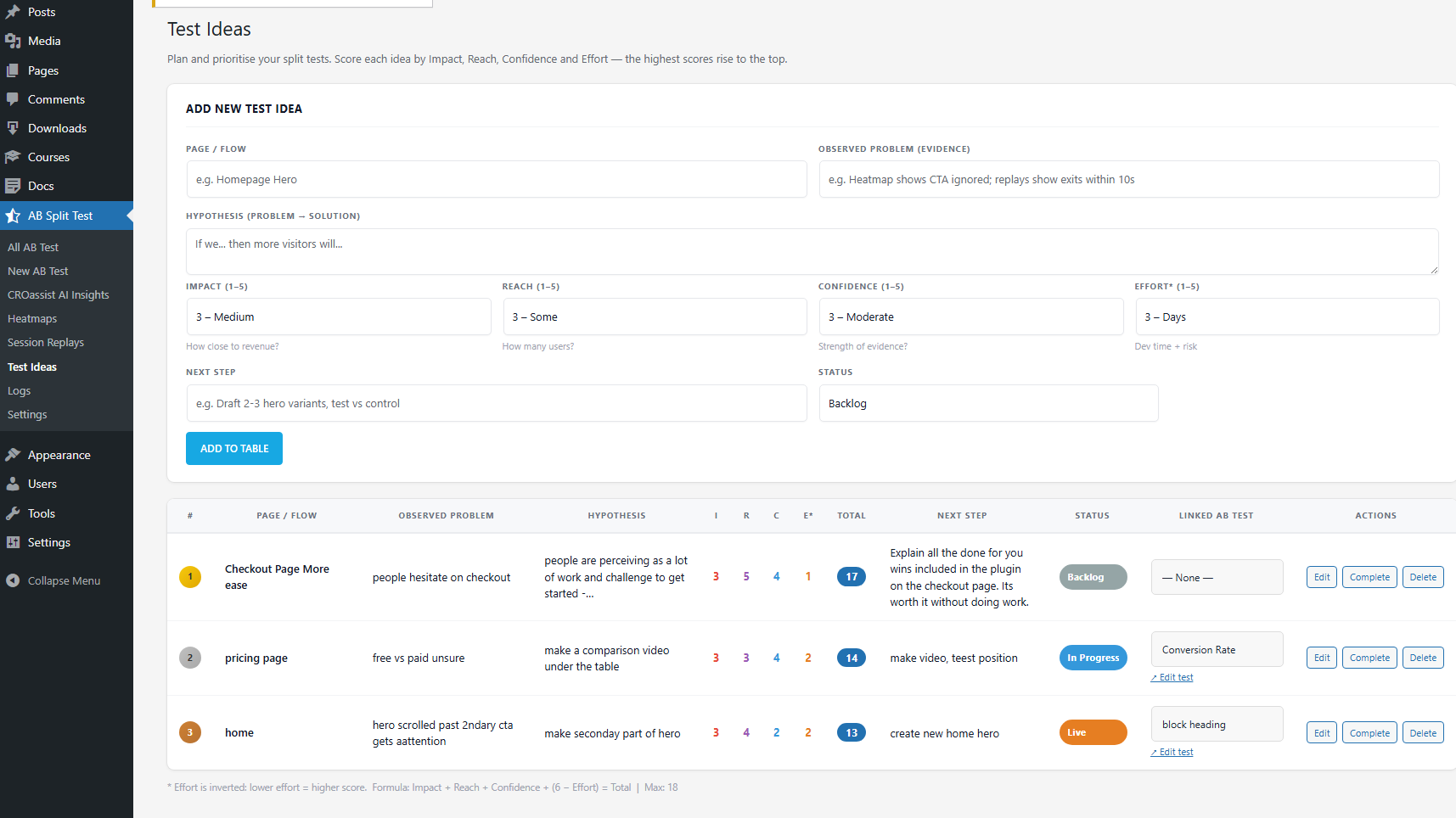
Sorted highest to lowest impact. Start at the top.
Some ideas will start to feel obvious once you look at the data. Take those easy wins first. The more you do this the faster you get at spotting problems, until the site is genuinely well-optimized and it starts getting harder again. That is a good problem to have.
Header and hero
The header and hero are the first things visitors see. If your analytics show a high bounce rate or low engagement, this is usually where to look first.
Your menu needs to be clear and compact. Too many items and visitors get distracted from what you actually want them to do. Your hero section needs to answer three things quickly:
- What is on this page?
- Why does it matter to me?
- Why should I trust you on this?
If the hero does not answer those three things fast, people leave.
Content
This is where I find the AI CRO Agent genuinely useful. Once you have looked at your own website content enough times, it starts to look right, even when it is not. The AI does not have that bias. It scans your page, understands your tone and audience, and gives you specific suggestions for making the content more compelling.
I use it on every page in the funnel. Some suggestions are obvious misses, some are genuinely useful. Filter out the ones that make sense, give them an impact rating, and add them to your list.
This is built directly into AB Split Test. No separate tool or API key needed. Just open the AI panel from the admin bar on any page and it scans your content automatically.
Heatmaps and session replays
AB Split Test includes built-in heatmaps and session replays. You can see exactly how visitors interact with your pages, where they click, how far they scroll, where they hesitate, and where they leave.
Look for visitors getting stuck. Look at scroll depth. Your content might be perfectly written but if nobody is scrolling far enough to see it, that is a problem worth testing.
Click maps will also show you places where people are tapping on things that are not clickable. That means they expect more information to be there. Maybe you could give it to them.
UX basics
A few things I check on every page:
F-pattern scanning. People skim web pages in an F-shape, reading across the top then down the left side. Make sure your key content is skimmable that way. If your most important information is buried in the middle of a dense paragraph, it is probably getting missed.
Clear call to action. Every page needs a clear next step. What do you want visitors to do when they finish reading? If the answer is not obvious from the page itself, add it to the list.
Footer. A good footer catches visitors who scrolled all the way down and still have questions. Make sure it addresses the things people might be wondering at that point in the decision process, and that there is a clear action for them to take.
Does it actually need a split test?
Some ideas are so obvious you should just fix them without testing. A button going to the wrong page, a missing contact number, a broken form. These do not need a hypothesis or a test. Just fix them and move on.
Split testing is for decisions where the right answer is not obvious. Use it when you have a genuine theory about what will improve conversions but you cannot be certain without data. If it is obvious, fix it. If it is uncertain, test it.
The scoring table
Once you have your list of ideas, sort them by estimated impact. Impact is your gut estimate of how much the change could move the needle. Start with the highest-rated ideas. The ones at the bottom of the list might never get tested and that is fine. Better to run three well-targeted tests than ten scattered ones.
If you are managing multiple sites or running CRO for clients, the Test Ideas feature in AB Split Test does this automatically. You log each idea, score it by Impact, Reach, Confidence, and Effort, and the highest-value tests rise to the top. When you are ready to run one, you promote it straight into the experiment workflow without starting from scratch.
That is the whole formula. Now you actually know what to test. That is the hard part. The rest is just running the tests and reading the results.