
AB Split Test vs Nelio: the difference in the details.
Nelio A/B Testing and AB Split Test are the two serious A/B testing plugins built for WordPress rather than bolted onto it. Both work. We disagree about where your test data lives, how you pay for it, and what the software does once a test is over. This page goes through all three, with the code, the changelogs and the prices as they stood on 12 November 2026.
We build AB Split Test, so read our column with that in mind. Where Nelio is better, it says so.
AB Split Test is build for 2026 and beyond
Most A/B tests don’t produce a winner. Across 127,000 experiments, Optimizely found only 12% beat the control on their main metric. Nelio’s AI helps you start a test. AB Split Test’s AI analyzes your site, your competitors, best practice and more, then reads the result, explains it, records what it taught you, and turns it into the next test. When most tests end without a clear winner, the second half is where all the opportunity is.
Nelio’s test modes are based on the old way of building with WordPress, template, widget and theme tests are based on legacy WordPress building methods, but available if you have that specific need. AB Split Test offers more flexibility to try anything, in a more modern way.
The other difference is architecture. Nelio sends tracking to its own cloud and meters it in tested page views. AB Split Test keeps everything on your server with no quota. Nelio chose the cloud model and compliance. WordPress can handle the tracking itself if the plugin is built for it, and below we show how ours is.
| AB Split Test | Nelio A/B Testing | |
|---|---|---|
| Where the data lives | Your server: tests, results, heatmaps, replays and analytics. Optional cloud hosted version for static sites and others that don’t want to manage a server. | Plugin in WordPress; tracking and stats processed on Nelio’s cloud |
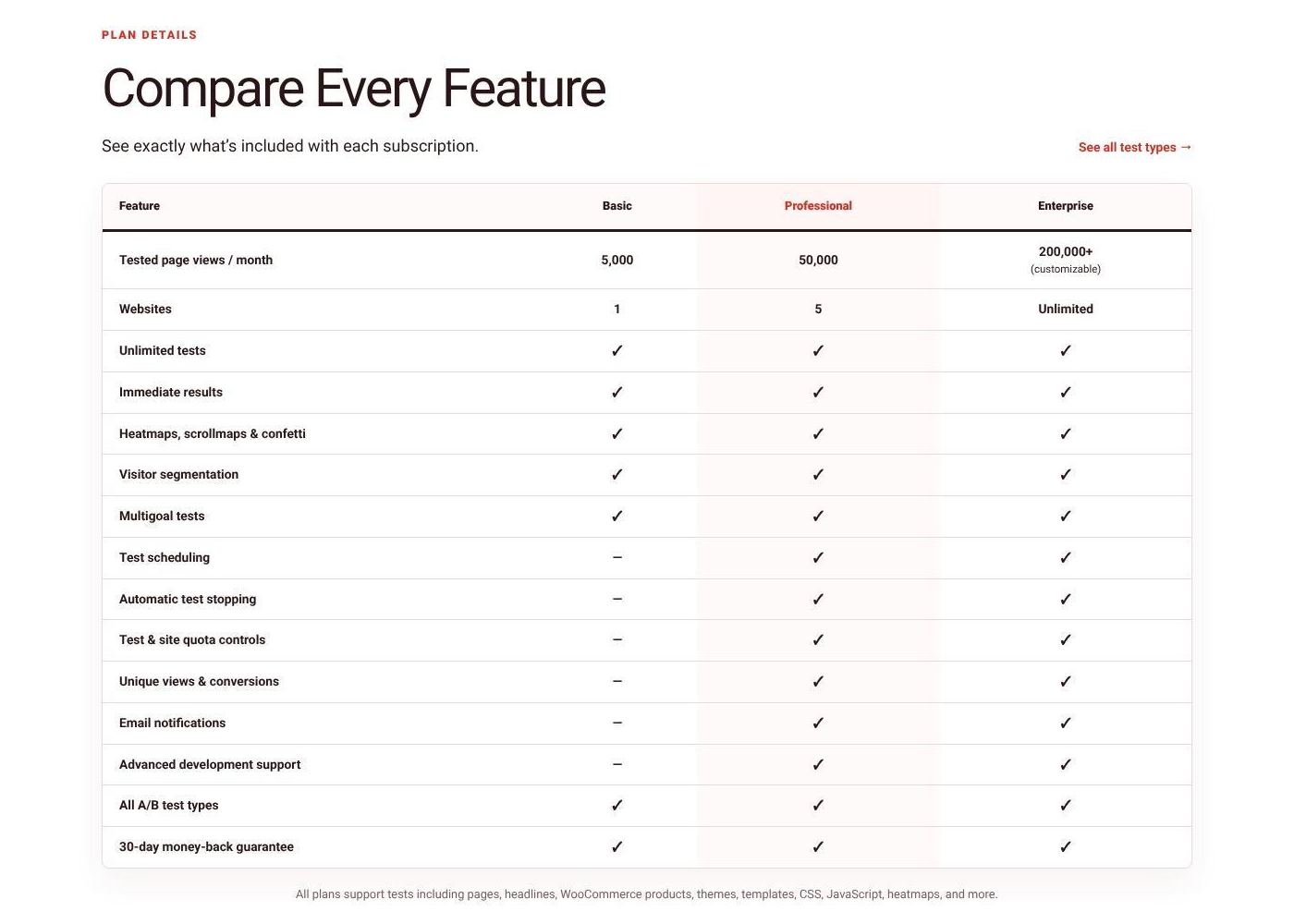
| Traffic limits | None. Unlimited traffic, tests and variations | Metered: 5,000, 50,000 or 200,000+ tested page views a month; free plan 500 |
| Sites per licence | Unlimited | 1, 5 or unlimited (Enterprise) |
| Test modes | Inside Blocks, Bricks, Beaver Oxy, Divi and Magic point-and-click, full page (browser, server-side or Cloudflare edge), HTML elements, code, CSS, JS, PHP | Pages, posts, custom post types, headlines, menus, widgets, themes, templates, CSS, JavaScript, WooCommerce |
| Non-WordPress sites | Yes, self hosted unlimited external domain mode for Shopify, static and hand-built sites, or cloud hosted if you dont want to manage servers | Separate Shopify app only |
| Winner engine | Bayesian, or a Thompson-sampling bandit; can optimize on revenue per visitor, and auto-optimize creating new variants automatically | Confidence-based winner; |
| Heatmaps and replays | INCLUDED IN PAID PLANS - Click, scroll, rage-click and dead-click maps, session replays and page analytics, all included | PAID ADD-ON Heatmaps, scroll maps and confetti; session recordings |
| AI | Complete CRO agent, ChatCRO, test ideas based on many factors, results summaries, CRO Learnings with written lessons and follow-up tests, variation QA, auto-optimize | Homepage test ideas (CSS and text), rule-based recommendations, Optimization Score |
| Agent access | 36 MCP tools, full REST API, WP-CLI | PHP hooks and a JavaScript events API; no MCP server, CLI or public REST reference |
| 2026 releases | 25 (2.4.1 to 3.0.0), most of them adding features | 22 (8.2.3 to 8.5.7), mostly fixes, compatibility and billing changes |
| Price | $49 a month, $399 a year or $999 lifetime, everything included | $39, $149 or $399 a month by quota; scheduling, auto-stop and email notifications start at Professional |
| Guarantee | 30 days | 30 days |
Which one fits you.
Pick Nelio if
- You want tests and results computed on Nelio’s servers rather than yours.
- You need theme-swap, template, PHP-hook or menu tests as named test types.
- Your traffic sits comfortably inside a monthly tested-page-view quota.
- You want the lightest possible frontend script, or a 30-day guarantee.
Pick AB Split Test if
- You want every visit, conversion and recording stored on your own server, with no quota.
- You test inside a page builder, or on sites that aren’t WordPress at all.
- You want AI that writes the variations and learns from every finished test, winner or not.
- You want an AI agent to create and read tests for you, and a lifetime licence option.
AI that starts a test vs AI that learns from one.
Nelio’s AI answers “what should I test first?” AB Split Test’s AI also answers the harder question: “what did that test teach me, and what should I try next?” Most tests don’t win, so the second question is the one that pays.
Nelio AI (version 8.5)
- At onboarding, Nelio AI reads your homepage and suggests a handful of tests. Nelio says these “focus on CSS and Text tests”.
- A recommendation engine that Nelio describes as “a variety of heuristics”: your homepage, recent content, high-traffic pages, pages in your menu, pages not tested for a while. Useful, but it is a to-do list rather than analysis.
- An Optimization Score that Nelio says is “not intended to be a perfect scientific metric”.
- AI suggestions run only when your plan includes the Nelio AI add-on.
- We found nothing in version 8.5.7 that reads a finished result, explains a losing test, or carries a lesson into the next one.
AB Split Test AI
- CRO agent: analyses your site, best practice and competitors, ranks ideas by expected impact, and can build, check, launch and monitor tests.
- AI results summary: on every result, up to two visitor segments worth a look, each with a one-line hypothesis and a one-click link to that view.
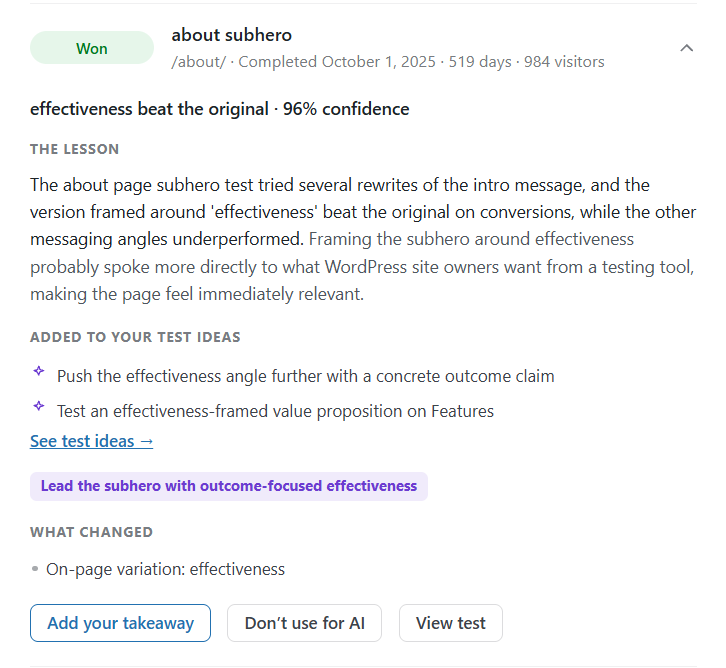
- CRO Learnings: every finished test, winner or not, becomes a recorded learning. New suggestions build on what won and stop repeating what lost.
- Written lessons: recent tests with 100+ visitors get a plain-English lesson: what happened, the likely reason, the principle, and what to test next.
- Follow-up tests: your latest learnings each add up to two ideas, one for the same page and one applying the lesson elsewhere.
- Variation check: screenshots each variation after you publish and flags broken, unchanged, 404 or login-walled pages, and pop-ups covering the change.
- Automatic CRO scans whenever your site has gone 28 days without one, and ChatCRO in the point-and-click editor, which can see click maps, scroll depth and rage clicks for the page you’re on.
- Auto-optimize (new in 3.0): a point-and-click test that ends on a winner, makes the winner the new control, has the AI write fresh variations and starts the next round on its own.
Why the losing tests matter
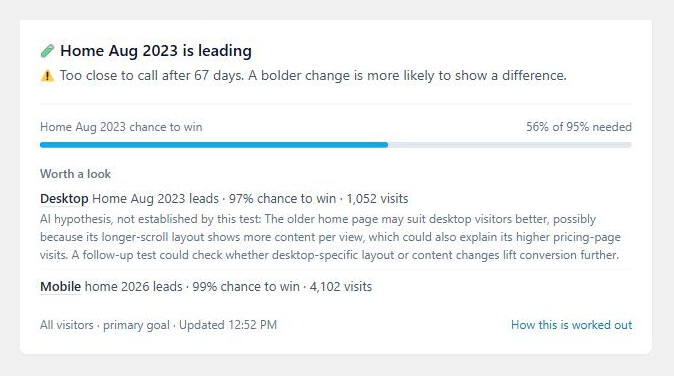
An inconclusive test only wastes traffic if you learn nothing from it. AB Split Test reports it as a finding (“too close to call after 67 days; a bolder change is more likely to show a difference”), records why, and feeds that into the next idea. In Nelio, a test that doesn’t win simply ends, and the recommendations point you at another page.
Where your tests actually run.
This is the difference comparison posts usually skip. We read both plugins’ source to write it.
Nelio: WordPress front end, Nelio cloud back end
The plugin lives in your dashboard, but the work happens on Nelio’s servers. The visitor’s browser sends page views, clicks and conversions to api.nelioabtesting.com, and results are fetched back from there when you open a report. In Nelio’s own words, “most experiment processing and reporting takes place on Nelio’s cloud services.” It keeps your database light, and it is why Nelio meters usage in tested page views. Nelio states it stores no personal data, and we have no reason to doubt it. It does mean the tests stop if the subscription does, and your history lives with them.
Caching is handled by a cookie called nabAlternative that the host cache must vary on. Nelio ships integrations for WP Rocket, LiteSpeed, W3 Total Cache, Kinsta and Autoptimize.
AB Split Test: all of it in your WordPress
Tests, visits, conversions, heatmaps and session replays are written to your own database by your own server. Nothing leaves the site. There is no usage meter because there is nothing to meter: rows in your database cost us nothing extra when you get busy. Results are computed on your server too, with Bayesian stats or a multi-armed bandit that shifts traffic to the leader while the test runs.
Full-page tests can run three ways: a browser redirect, server-side at the original URL, or at the edge. Edge mode pushes the test to Cloudflare Workers, so the variant is chosen at the CDN before the HTML leaves it, with no flicker and no cookie-varying cache to configure.
“WordPress can’t handle the tracking” is a build choice
The case for a cloud back end is that test tracking is too heavy for WordPress. That’s true if you build it the naive way: write every visit as a row in wp_postmeta through admin-ajax and a busy site will choke. That is a problem with how the plugin is engineered, not a limit of WordPress. Here is how AB Split Test handles it:
- A first-party REST tracking endpoint with a write-ahead queue (since 2.6.0), so bursts of visitors are queued and written in batches instead of dropped or double-counted.
- An optional fast tracking endpoint (new in 3.0) that records events without loading WordPress at all: under 1 ms of CPU per event, against 21 to 32 ms through the WordPress REST route.
- A dedicated results table,
wp_abst_results(since 2.6.2), not postmeta. - Heatmap and journey data written to daily log files and read back with a streaming reader, so memory stays flat as the files grow. Retention is configurable and defaults to 30 days.
- Atomic, capped rate limiting on Redis or APCu object caches (since 2.6.9), so a flood of events can’t stampede MySQL.
- Cloudflare edge mode for full-page tests: the variation is decided at the CDN, so cached pages never touch WordPress to pick one.
Nelio’s cloud isn’t the price of scale. It’s the reason you pay per tested page view. And if you’d rather not host it, AB Split Test Cloud runs the same engine on Cloudflare’s network. Self-hosting is a choice you get to make.
Fair is fair
Nelio’s frontend script is lighter: about 16 KB gzipped against our 31 KB. Ours carries heatmaps, replay, form and revenue tracking in one file. In edge mode the visitor never waits on it to see the right variant, but if you run browser mode on a slow site, that 15 KB is a real difference.
What you can test, and how you build it.
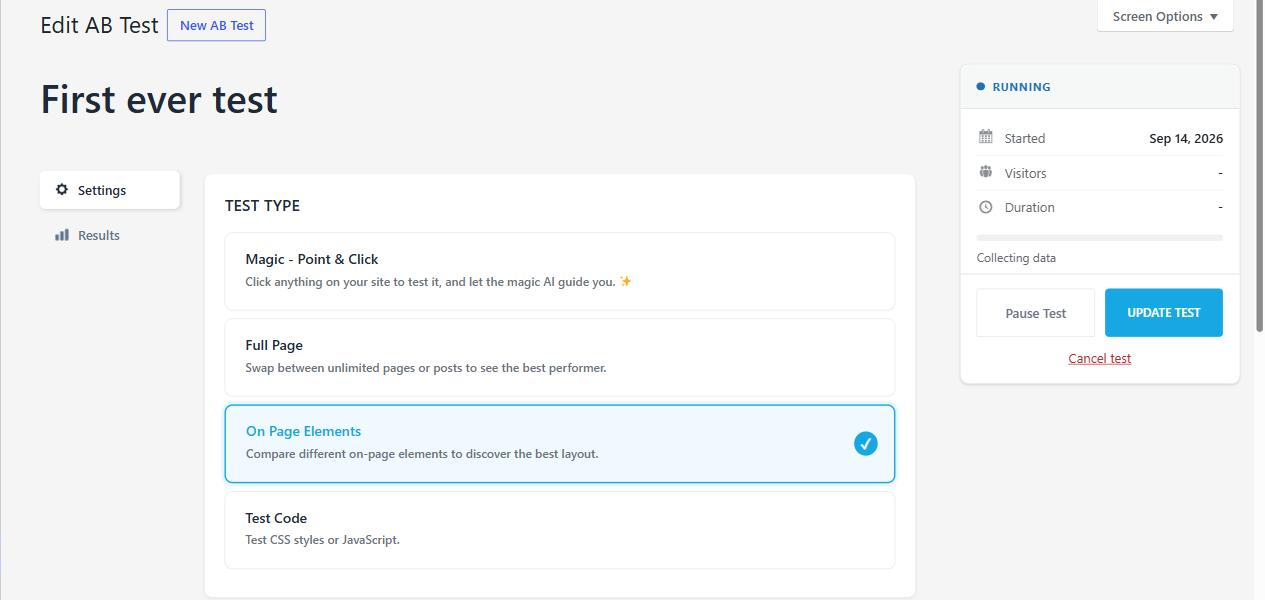
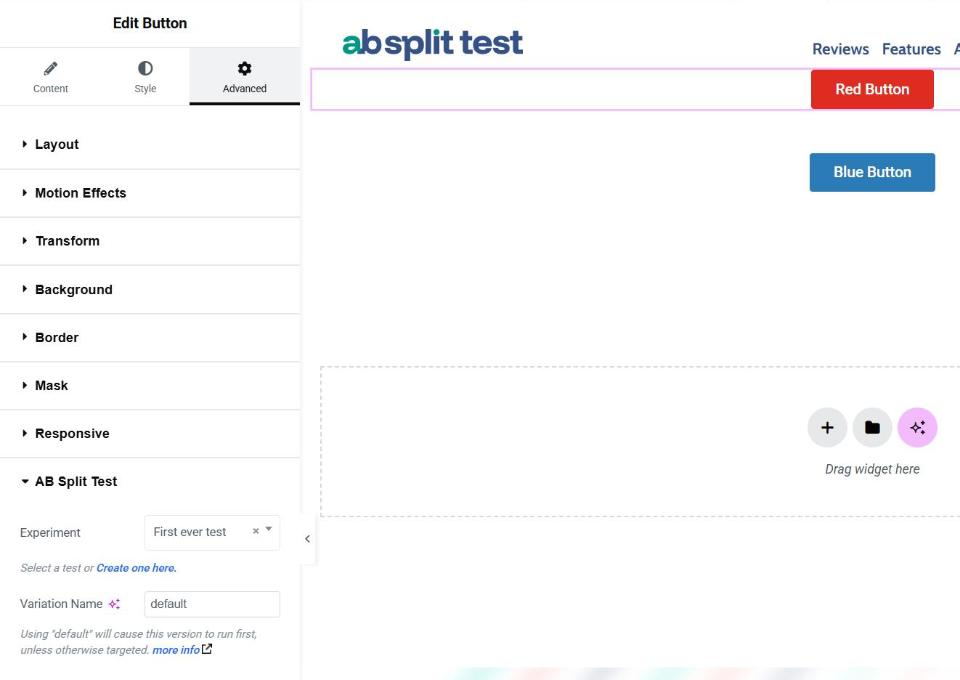
Nelio lists eleven named test types. AB Split Test has four. That doesn’t mean Nelio tests more things; the two plugins slice the job differently. Nelio gives you a type per thing (a headline test, a menu test, a widget test, a theme test). AB Split Test gives you a way of working per situation: pick any element inside your builder, swap whole pages, test code, or point and click on the live page and let the AI write the variants.
| AB Split Test | Nelio A/B Testing | |
|---|---|---|
| Pages and posts (split URL) | Yes, served by browser redirect, server-side at the original URL, or at the Cloudflare edge | Yes |
| Elements inside a page builder | Yes, native controls in Elementor, Bricks, Beaver Builder, Oxygen, Breakdance, WPBakery, Divi and Gutenberg | Whole-page alternatives only; the builder is used to make the copy |
| Headlines, menus, widgets | Yes, as on-page element tests where the builder or theme renders them | Yes, as dedicated test types |
| Point-and-click with AI variants | Yes, Magic mode: edit, restyle, hide or move anything on the live page | No, Nelio AI suggests what to test; it does not write variants |
| CSS and JavaScript tests | Yes | Yes |
| Popups | Yes, Elementor popups documented | Yes |
| WooCommerce products and pricing | Yes, plus SureCart, EDD and FluentCart revenue goals (WooCommerce testing) | Yes, WooCommerce and SureCart |
| Sites that aren’t WordPress | Yes, every test type plus heatmaps and replays on any domain: Shopify, static or hand-built sites (Split Test Server) | Separate Shopify app, priced separately ($55 to $449 a month) |
| Whole theme swap | No | Yes |
| PHP hook tests | No | Yes |
| Templates and synced patterns as named types | Test them as elements | Yes |
| Multivariate | Yes | Yes |
| Goals | 30 goal types: clicks, scroll, time, URL, JavaScript, 18 form plugins, 4 commerce platforms, revenue per visit | Page views, clicks, form submissions, custom events, WooCommerce and SureCart orders and order value |
Checked against AB Split Test 3.0.0 and Nelio A/B Testing 8.5.7, 12 November 2026. Tell us if something here has changed and we will fix it.
We both ship often, but ours are innovations.
Nelio put out 22 releases in 2026 and AB Split Test 25, so neither is standing still. The difference is in the release notes. Most of Nelio’s are fixes, compatibility and billing work; most of ours add something you can use. In 2026 and beyone with the web changing faster than ever, you need a tool that will modernize with you.
| 2026 | AB Split Test | Nelio A/B Testing |
|---|---|---|
| November | 3.0.0: auto-optimize, fast tracking endpoint, heatmap overlay in the point-and-click editor, setup wizard, Independent Analytics | No release yet |
| October | 2.6.13: CRO Learnings, written lessons, follow-up test ideas, AI variation check, bot detection, few-click MCP setup | 8.5.5 to 8.5.7: WS Form support, in-plugin upgrades, deprecated AI settings removed, GDPR consent before quota check |
| September | 2.6.11: every test type on external domains, with heatmaps and replays. 2.6.12: AI results summaries, starter audiences | 8.5.4: billing flow change, loading overlay fix |
| August | 2.6.8: Page Analytics, visitor data lookup API, server-side WooCommerce tracking rebuilt | 8.5.3: results by day, week or month, plus fixes |
| July | 2.6.4: reusable audiences, automatic AI CRO scans, redesigned weekly report. 2.6.5: AI analyzer firewall key | 8.5.0 to 8.5.2: new overview and welcome screens, Optimization Score and recommendations, GA settings per test |
| June | 2.6.0: hide and move in Magic, every setting via REST, CLI and MCP, queued first-party tracking endpoint | 8.4.1: excluded IPs on every plan, test status tracked in Nelio’s cloud |
| May | 2.5.1: results by device size, Test Ideas pipeline with ICE scoring. 2.5.5: full-page tests on other websites | 8.4.0: WordPress 7.0 support, custom traffic allocation, total order value goal |
| April | 2.5.0: native WordPress Abilities and MCP, one test API across REST, CLI and MCP | 8.3.0 to 8.3.5: debugging screen, smaller public script, fixes |
| January | 2.4.1: public reports, form conversions, Welch’s t-test for revenue | 8.2.3 to 8.2.6: bug fixes, including a security fix |
From the AB Split Test changelog and Nelio’s changelog on wordpress.org. Highlights only; February and March were fix releases for both.
Two of Nelio’s 2026 headline features, custom traffic allocation and order value goals, have been in AB Split Test for a while: dynamic traffic allocation since 2.1.0 (September 2025) and order value optimization since 1.5.0 (July 2023).
Can an AI agent run your tests?
More site work is now done by AI agents like Claude Code, Cursor and Codex. If your agent can’t create a test and read the result, your testing tool isn’t ready for that. Both plugins document themselves for agents to read; only one lets an agent run the tests.
| AB Split Test | Nelio A/B Testing | |
|---|---|---|
| Help docs | 170 articles | 8 help categories plus a getting-started guide |
| Developer reference | REST API, WP-CLI commands, MCP tool schemas, JavaScript and PHP filters | PHP hook reference and a JavaScript events API |
| Docs for AI | Agent quickstart, llms.txt product reference, ready-made MCP configs for Claude Code, Cursor, Windsurf and Codex | llms.txt and a Markdown copy of every help page |
| An agent can create, run and read tests | Yes, 36 MCP tools plus REST and WP-CLI, with no browser login | No, no MCP server, CLI or public REST API |
How you pay: a quota or a licence.
Nelio sells tested page views. Every load of a page with a running test counts, whether it is a new visitor or the same person refreshing, so the more traffic you test, the more you pay. AB Split Test sells a licence. Run as much traffic through as many tests on as many sites as you like; the price does not move.
| AB Split Test | Nelio A/B Testing | |
|---|---|---|
| Free plan | Lite: 1 active test, 1 variation, 1 goal. No traffic or time limit, and every install starts with a 7-day trial of everything. | 500 tested page views a month, 1 site. Roughly one small test. |
| Monthly | Teams: $49 a month, unlimited sites and traffic | Basic $39 (5,000 views, 1 site), Professional $149 (50,000 views, 5 sites), Enterprise $399 (200,000+ views, unlimited sites) |
| Yearly | $399 a year | $374, $1,428 or $3,828 a year |
| Lifetime | $999 once, split payments available | No |
| Traffic limit | None | Per plan; extra views $19 per 5,000 |
| Scheduling, auto-stop, email notifications | Every paid plan | Professional and up |
| Session recordings | Included, stored on your server | Add-on: $9 a month on Basic, $29 on Professional, included in Enterprise |
| AI | CROassist writes variations, audits pages, runs the agent and learns from results. Included, or bring your own key. | Nelio AI suggests tests, with the Nelio AI add-on |
| Money-back guarantee | 14 days, no questions | 30 days |
AB Split Test prices from our pricing page; Cyber November runs until 2 December: Teams Yearly $299 a year (and it renews at $299), Lifetime $799. Nelio prices in US dollars from their checkout on 12 November 2026; they may differ by country and include VAT where it applies.
Worked example
A store doing 60,000 tested page views a month outgrows Nelio Professional ($149 a month) and needs top-ups or Enterprise at $399 a month. On AB Split Test it is the same $399 a year whether it is 60,000 views or 6 million, and the lifetime licence stops the bill altogether. A quota also changes behaviour: when every tested view costs money, people test fewer pages for shorter periods, and that is how you end up with underpowered tests that teach you nothing.
Both show you a winner, we find insights nobody else does.
Nelio reports conversion rate and confidence per variation, computed in their cloud, and can stop a test automatically on Professional and above. AB Split Test reports conversions, chance to win and revenue per visit for every goal, computed on your server, and completes tests automatically on any paid plan. Because the raw data is yours, you can also pull it over REST, WP-CLI, webhooks or MCP, or hand a client a public results link with no login. We add multiple goals and engagement metrics and audiences so that our stats engine can find insights, even in tests with no uplift.
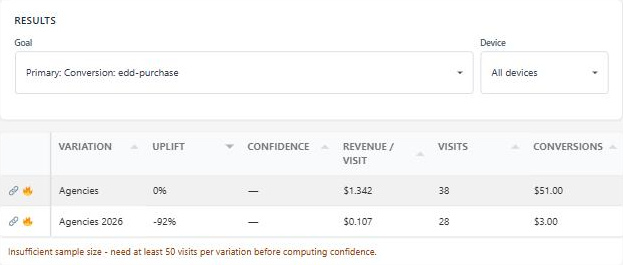
Heatmaps and scroll maps ship with both. Session replay is where they split: Nelio sells it as an add-on below Enterprise and records to their cloud; AB Split Test includes it and records to your database, with UTM, referrer, device and variation filters.
Both are maintained, both are real.
Nelio
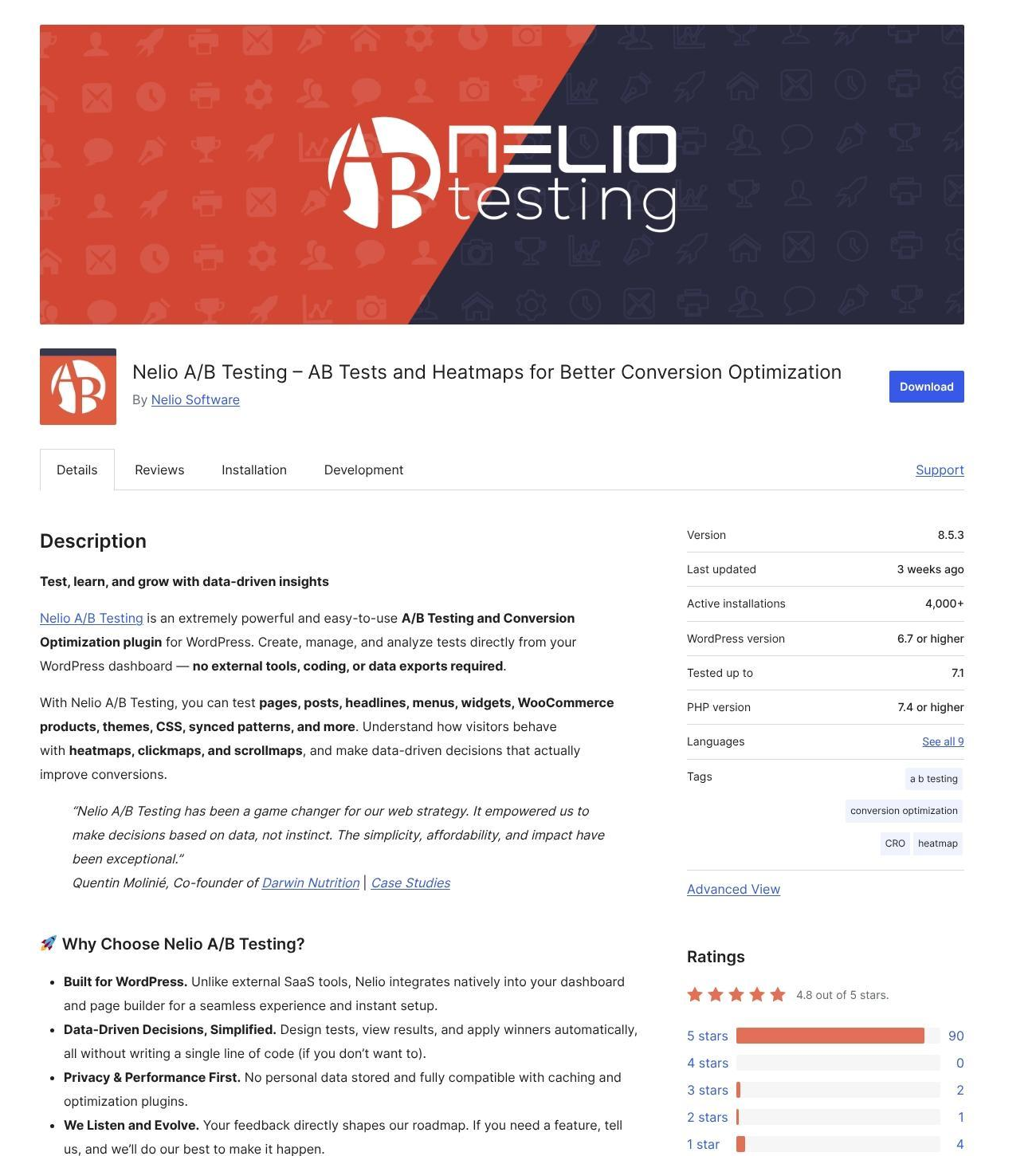
Founded in Barcelona in 2013 by a three-partner team that still runs it. 4,000+ active installs on wordpress.org, 4.8 out of 5 from 99 ratings, version 8.5.7 released on 26 October, and a support team that reviewers consistently praise.
AB Split Test
Shipping since 2018, first as a Beaver Builder extension, now for every major builder, not builder, MCP and non WordPress sites. Distributed from this site rather to over 1200 active installs; with a large reviews page . Built by the founder of a WordPress agency that needed it, and still run by him.
Nelio vs AB Split Test, FAQ.
Can I run both at once?
Technically, yes, but do not. Two plugins deciding variants on the same page will fight over the cache and double-count conversions. Finish or pause your Nelio tests, then start fresh.
Will self-hosted tracking slow my site down?
Not if the plugin is built for it. AB Split Test queues events, stores results in its own table, writes heatmap data to log files, we record events without loading WordPress at all, so your server never gets bogged down. We’ve pressure tested this to millions of views per month. If you’d rather not host anything, AB Split Test Cloud runs the same engine on Cloudflare edge (included in the 1 plan, no upsells)
Does AB Split Test need Cloudflare?
No. Edge mode is optional and needs a Cloudflare zone with Workers. Browser and server-side modes work on any host with no setup. Our cloud mode uses Cloudflare to host your tests, but doesn’t require you to have a license, or change your DNS etc to use.
Is my visitor data safe with either?
Nelio states it stores no personal data and is GDPR and CCPA compliant. AB Split Test never sends visitor data anywhere; it is on your server under your privacy policy, with a cookie-consent mode for sites that need it. AB Split Test Cloud stores no personal information and is also GDPR CCPA compliant.
What do I lose leaving Nelio?
Theme-swap and PHP-hook tests as named types, a 10kb lighter frontend script (no difference if using Nelios session replays add-on). What you gain is your data, no traffic bill, a genuinely useful AI that writes tests variants and learns from every finished test, agent access, edge delivery, and a lifetime option for those that wand predictability.
Ready to compare on your own site?
Install the free plan, run one real test on a page you care about, and look at where the data ends up. That answers most of this page in a week.