
For WooCommerce
A/B test your WooCommerce store. Products, prices, cart and checkout.
Split test product pages, offers, cart and checkout inside WordPress, and read the result the way a store owner should: revenue per visit, tracked server-side from the order itself, so ad blockers, custom checkouts and payment webhooks do not lose your conversions.
Unlimited traffic and tests on one licence · order data never leaves your server · works with your page builder
What to test
The three places a WooCommerce store leaks money.
Every store has the same funnel: a visitor lands on a product, decides to add it, then has to survive your cart and checkout. Each step is a page you already have, and each is testable without touching code.
Product pages
Test the title, the gallery order, the short description, badges and guarantees, the add-to-cart button and what sits next to it. If you build product templates in Elementor, Bricks, Beaver Builder, Oxygen, Breakdance or WPBakery, the AB Split Test controls are inside the builder. If you use the WooCommerce block templates, use Magic point-and-click.
Offers and pricing
Test how a price is presented: anchor pricing, bundles, “save 20%” badges, shipping thresholds and urgency copy. To test two actual prices, duplicate the product, set the second price, and run a full-page test between the two product URLs. Orders from either variation are attributed to the test automatically.
Cart and checkout
Test cart page layout, cross-sells, trust badges, express-pay placement, checkout field order and copy. Conversions are counted from the order, not from a thank-you page load, so a checkout redesign that skips the default thank-you page still measures correctly.
Measured in money
Results in revenue per visit, not just conversion rate.
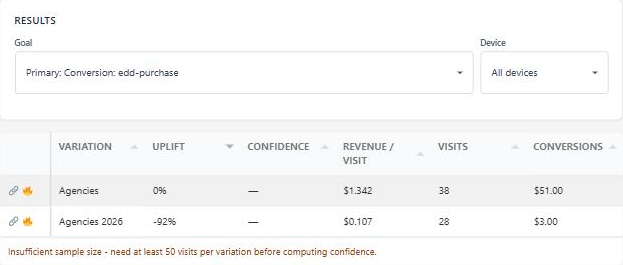
A variation that converts 5% more but sells cheaper items is a loss. Turn on Use Order Value on any goal and every conversion is weighted by what the customer paid. Results show test revenue and revenue per visit next to visits and confidence, so the winner is the one that made more money.
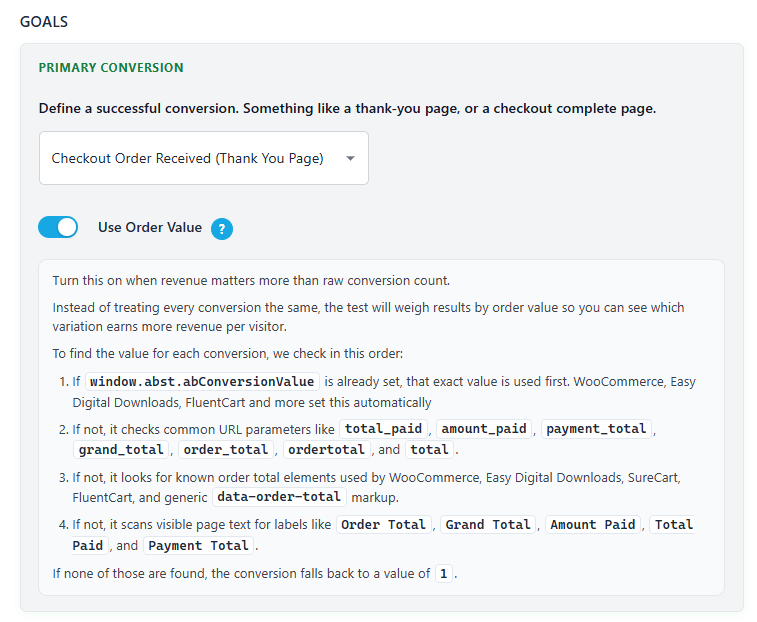
The order total comes straight from WooCommerce when the order completes. For other checkouts it falls back to URL parameters, then known order-total markup, then visible page text, so revenue tracking keeps working on custom thank-you pages.
Server-side tracking
Conversions that survive ad blockers, custom checkouts and payment webhooks.
Most testing tools count a WooCommerce sale when the browser loads the thank-you page. That fails when a blocker strips the script, when a customer closes the tab after paying, when the gateway confirms by webhook, and on every funnel builder that replaces the default checkout.
Counted from the order
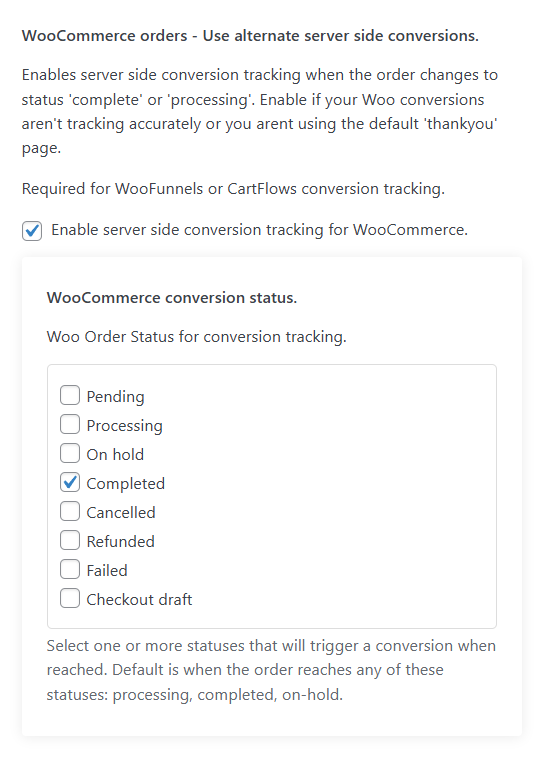
AB Split Test hooks WooCommerce itself: order received, payment complete and order status changes. Pick which statuses count as a conversion, so a “processing” card payment and a “completed” bank transfer both register when you want them to.
Attributed without cookies
Advanced tracking writes a visitor ID into the order meta when the order is placed. When the payment is confirmed later, even by a Stripe webhook with no browser in the loop, the conversion is matched to the right variation from the order itself.
Funnel builders included
WooFunnels, FunnelKit and CartFlows replace the standard checkout and confirm payment server to server. Enable advanced tracking and their orders attribute correctly. Setup guide.
Goals
Goals built for stores, reusable across every test.
Define a goal once and attach it to any test. A store purchase can be the primary goal on every new test by default, with viewed cart and reached checkout as sub-goals, so one product-page test tells you whether the variation got more people into the cart, through checkout, and paying.
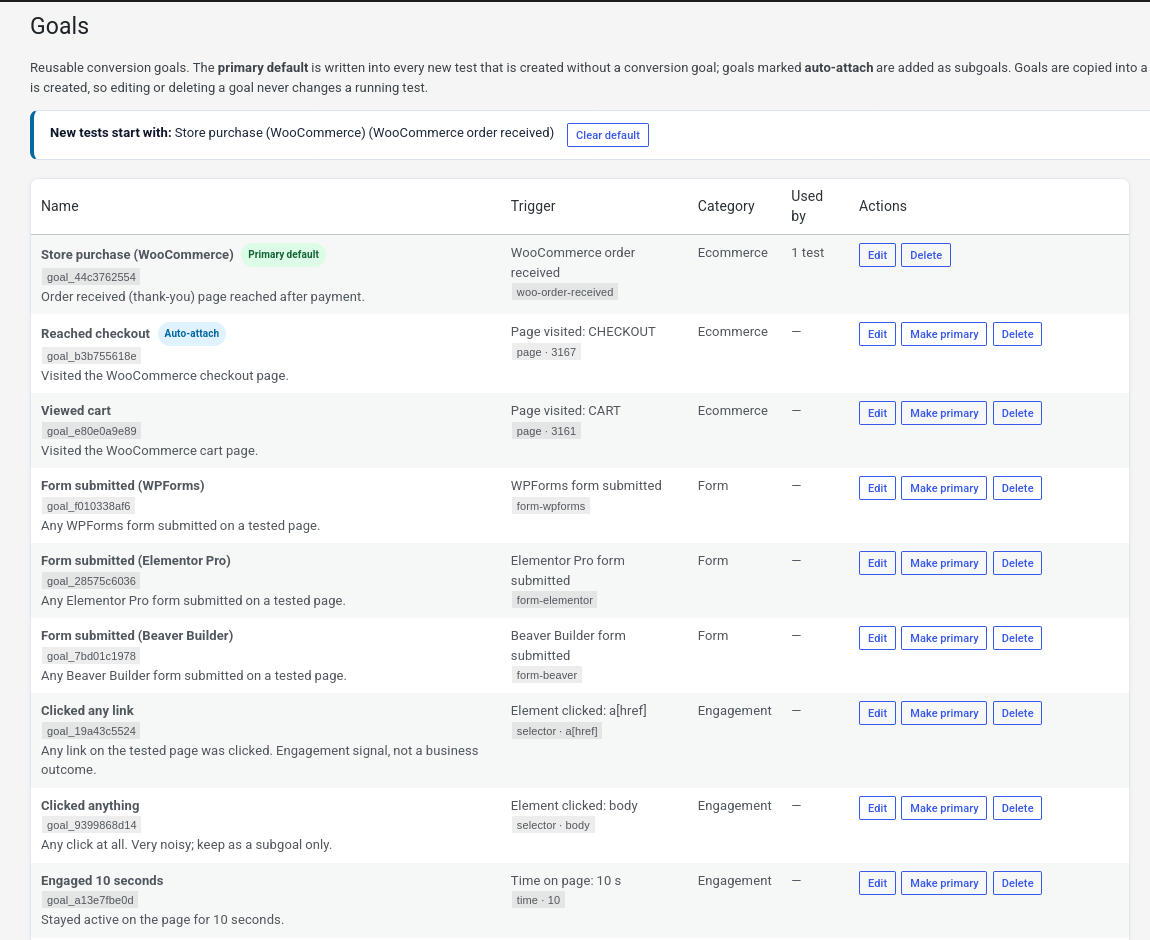
- WooCommerce order received, plus SureCart, Easy Digital Downloads and FluentCart order-paid goals for stores that are not on Woo.
- Page visited, element clicked, scroll depth, time on page, JavaScript event and URL goals for the steps before the sale.
- Form submissions from 18 form plugins, for quote and enquiry flows.
- Multiple goals per test, with per-goal results and device breakdowns.
- Conversions pushed to GA4, Meta Pixel, Microsoft Clarity and Plausible if you want them in your analytics too.
Why stores pick AB Split Test
Built for the traffic and the trust a store needs.
No traffic bill
Stores are the highest-traffic sites in WordPress, and hosted testing tools charge by page view. AB Split Test is one licence with unlimited traffic, tests and sites. A Black Friday spike costs nothing extra.
Order data stays home
Visits, conversions, order values, heatmaps and session replays are stored in your own database. No customer or order data is sent to a third-party testing service.
Cache and speed safe
Runs alongside page caching and CDNs. Edge mode serves full-page variants from Cloudflare before your cache is asked, with no flicker and no cookie-varying cache to configure.
Bandit mode for live promotions
For a sale that lasts a week, switch a test to the multi-armed bandit and it moves traffic to the leading variation while the test runs, so you earn from the winner before the test is over.
AI that writes the variations
CROassist reads the product page, suggests what to test, and writes the copy variations. Point and click on the element, approve, launch.
Agency ready
Manage every client store from the Agency Hub, hand clients a public results link with no login, and white-label the reports.
Questions store owners ask
WooCommerce A/B testing, FAQ.
Do I need the default WooCommerce thank-you page?
No. With server-side tracking on, the conversion fires when the order reaches a status you choose, whatever page the customer ends up on.
Can I test two different prices?
Yes. Duplicate the product with the second price and run a full-page test between the two product URLs. Use Order Value then shows which price made more revenue per visit, not just which sold more units.
Will it slow down my checkout?
The plugin loads one script and talks only to your own server. Nothing is fetched from a third-party testing service during checkout. For full-page tests, edge mode removes even the client-side swap.
Does it work with WooFunnels, FunnelKit or CartFlows?
Yes. Enable advanced tracking so the visitor ID is stored on the order, and payments confirmed by webhook attribute to the right variation.
What about SureCart, EDD or FluentCart?
Each has its own order-paid goal, and Use Order Value works with all of them.
Start with one product page
Install the free plan, pick your best-selling product, and test the one thing you have always wondered about. The order-value results will tell you in a couple of weeks whether it was worth it.