
All / Advanced / Conversions
Can I track WooCommerce conversions using server-side tracking?
Teams Included on the Teams plan. Not available on the Lite version. Upgrade →
Yes! If you’re running a WooCommerce store and your conversions aren’t tracking accurately - especially when you’re not using the default WooCommerce “thank you” page - you can enable server-side conversion tracking as a fallback.
This method triggers a conversion when the order status changes to “processing”, “completed” or “on-hold” (or the statuses you choose) - making it much more reliable for custom checkout flows, third-party gateways, or cases where the user doesn’t reach the thank you page.
How to enable it
-
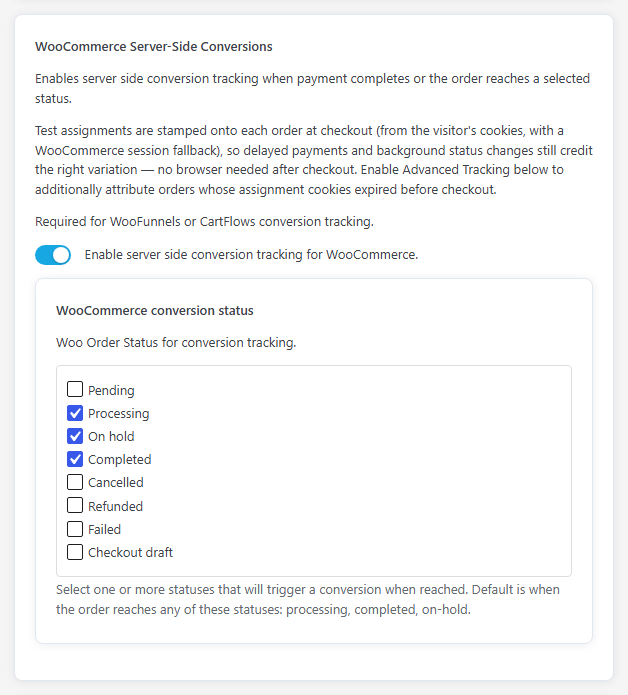
Go to AB Split Test > Settings > Conversions and find WooCommerce Server-Side Conversions
-
Toggle Enable server side conversion tracking for WooCommerce. Optionally pick statuses under WooCommerce conversion status.
-
Click Save Changes.
Once enabled, AB Split Test will count a conversion when an order is marked as processing, completed or on-hold (or the statuses you choose) - no thank you page visit required. Advanced Tracking (UUID) is optional: turn it on only if you also want to attribute orders from visitors whose test cookies expired before checkout.
Tracking Additional WooCommerce Statuses
By default, server-side tracking counts orders marked as "processing", "completed" or "on-hold" in WooCommerce.
If you'd like to track other order statuses (such as "pending", "failed", etc.), tick them in the WooCommerce conversion status list under WooCommerce Server-Side Conversions and click Save Changes.
Client-side only: the abst_convert_statuses filter
The abst_convert_statuses filter only applies when server-side tracking is off. It limits which order statuses pass an order value on the thank-you page (default list: "processing", "completed"). To also allow “on-hold” orders, add this snippet to your theme’s functions.php file or a custom plugin:
add_filter( 'abst_convert_statuses', function( $statuses ) {

$statuses[] = 'on-hold'; // Add 'on-hold' to the tracked statuses

return $statuses;

});
Why Client-Side Order Value Tracking Can Fail
If you're using client-side WooCommerce conversion tracking (tracking on the thank-you page without server-side enabled) and have "Use Order Value" enabled, order values may not track correctly.
Common reasons this happens:
- Conversion status - If you use the
abst_convert_statusesfilter, only the statuses it lists (default "processing" and "completed") pass an order value. If the order has a different status when the thank-you page loads, the order value won't be captured. - The
woocommerce_thankyouhook isn't firing - Client-side tracking relies on this hook. Some checkout plugins, custom checkout flows, or payment gateways skip this hook entirely.
This is why server-side tracking is recommended - About 30-50% of WooCommerce sites need server-side tracking for reliable order value tracking.
Custom Order Value Workarounds
If you need to track order values on the client-side thank-you page, you can pipe in your own window.abst.abConversionValue. However, individual fixes won't be a fix for all people due to different WooCommerce configurations and checkout flows.
Coming Soon: Dynamic Conversion Values
In the next update, AB Split Test will include dynamic conversion values. It will look through the page for an order total. If you check "Use Order Value," it will try to get it from WooCommerce or wherever. But if not, it'll search the URL and search the page for conversion values.