
All / Agency / Conversions
Multiple Conversion Goals - Subgoals
Teams Included on the Teams plan. Not available on the Lite version. Upgrade →
Gather more data to see how your test variations affect individual steps of your funnel.
Available Subgoal Types
-
Page or Post Visit - Choose any published page, post, or custom post type
-
URL Visited - Enter a URL that, when matched with the current page, will trigger the subgoal
-
Text Visible on Page - Triggers when specific text appears on the page
-
Element Clicked - Fires when a user clicks a specific element (via CSS selector)
-
Link Clicked - Tracks clicks on internal or external links
-
Time Active - Fires when a user is actively engaged for a set amount of time
-
Scroll Depth - Fires when a visitor scrolls to a set percentage of the page
-
Conversion Element Visible - Triggers when a specific CSS class is present (e.g.
ab-123 ab-goal-2) -
JavaScript Event - Manually trigger a subgoal via code using
abstGoal(testId, subgoalId) -
WooCommerce, SureCart, FluentCart, Easy Digital Downloads, form and HubSpot Form triggers - Shown when those plugins or integrations are active
How to View Results
- Go to your Results tab
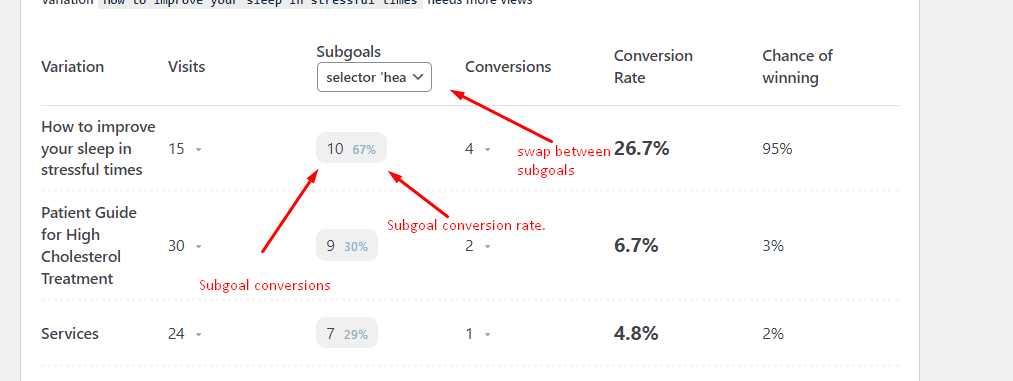
- Your goals will be displayed next to your conversions
- Use the Goal drop-down above the results table to swap between subgoals.
- Results are displayed as goal conversions and conversion rate.