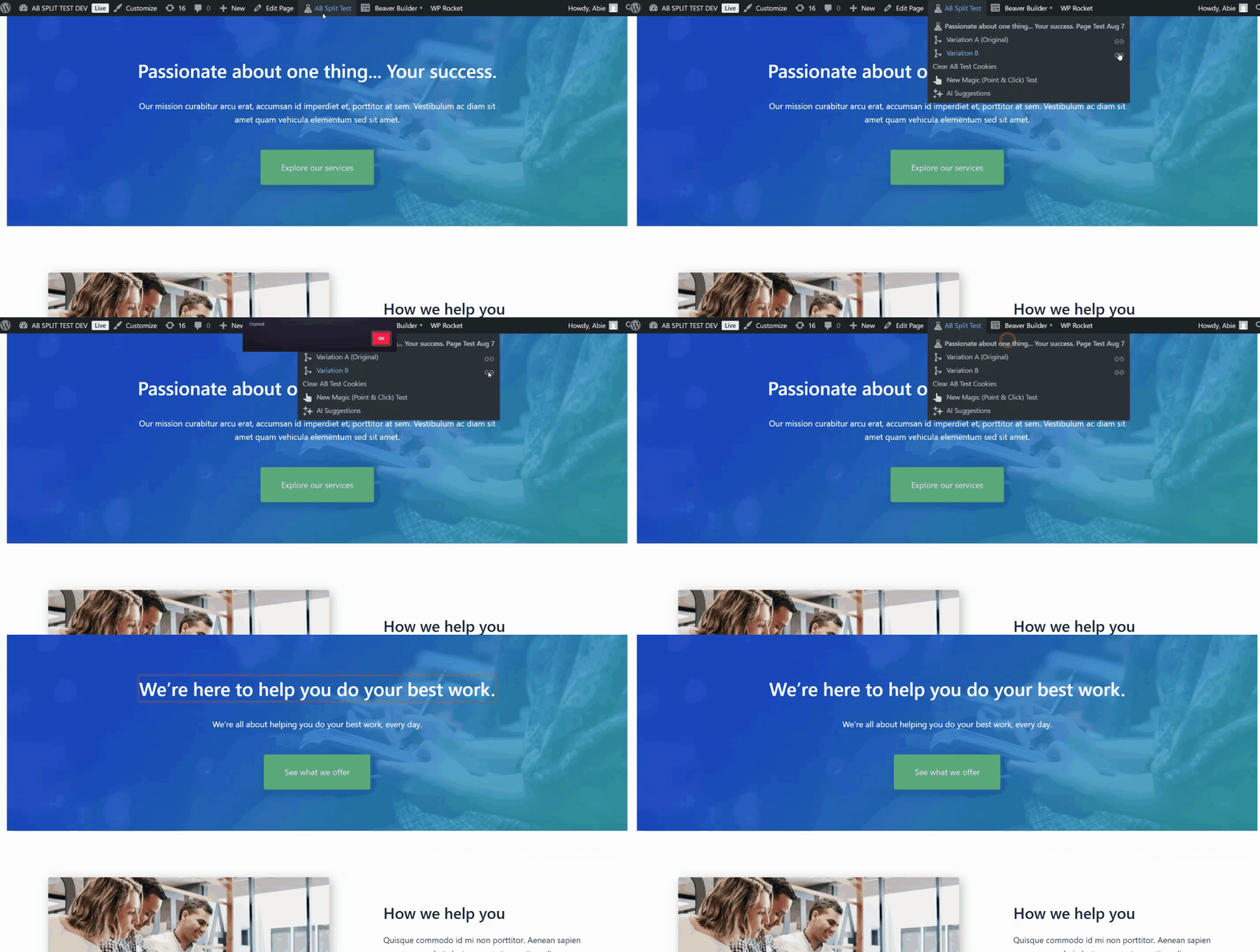
Preview a Test Variation and Copy Its URL
Quickly preview any variation of a running AB Split Test directly from the frontend and get a sharable link to that exact variation.
Steps:
-
Open a Page with a Running Test
-
Go to the frontend of any page that currently has a Split Test running.
-
-
Access the AB Split Test Menu
-
Hover over the AB Split Test menu in the WordPress admin toolbar.
-
-
Find Your Test Name
-
Your active tests will be listed by their names (e.g., Footer CTA Free Plugin Download, Hero Download Button, Passionate about one thing…).
-
-
Select a Variation
-
Under your test name, your variations will be listed by name. Magic tests show Variation A (Original), Variation B, and so on.
-
Click the variation you want to preview. It is shown on the page straight away, with a highlight around the element that changed. For full page tests, the variation page opens in a new tab.
-
To get a link to that variation, click the link icon next to it (Copy Preview URL). A popup saying “Copied!” means the Preview URL has been copied to your clipboard.
-
-
Preview the Variation
-
Paste the copied URL into your browser’s address bar.
-
The page will load showing the chosen variation.
-