
AI Features Overview
Teams Included on the Teams plan. Not available on the Lite version. Upgrade →
AI-Powered Testing in ABSPLITTEST
ABSPLITTEST includes advanced AI features powered by OpenAI to help you create better tests, generate compelling copy variations, and optimize for conversions.
AI Features
1. Magic Bar AI Suggestions
The Magic Bar allows you to visually select elements on your page and get AI-powered variation suggestions.
How to Use:
- Add
?abmagicto any page URL - Click on any text element
- Open AI Suggestions in the Magic Bar to see alternatives for that element
- Click a suggestion to add it to your test variations, then edit it if needed
- Click Generate More Suggestions if you want more options
AI Capabilities:
- Rewrites text to be more compelling
- Maintains casual, conversational tone
- Avoids salesy language and clichés
- Considers page context for better suggestions
- Generates multiple variations instantly
2. Page Analysis & Test Suggestions
AI can analyze your entire page and suggest high-impact tests based on conversion optimization principles.
Features:
- Overall page conversion rating (0-100)
- 3-5 quality test suggestions per page
- Identifies missing content opportunities
- Provides specific text variations
- Explains reasoning behind each suggestion
What AI Analyzes:
- Headlines and value propositions
- Call-to-action buttons
- Social proof and trust signals
- Form fields and friction points
- Content clarity and messaging
3. Test Idea Generator
Generate test ideas based on proven behavioral psychology principles and UX best practices.
Behavioral Principles Applied:
- Hick-Hyman Law - Reduce choice to improve decision speed
- Fitts’s Law - Make key actions larger and easier to reach
- Jakob’s Law - Follow familiar UX patterns
- Miller’s Law - Simplify information to avoid overload
- Aesthetic-Usability Effect - Improve visual appeal to boost trust
- Von Restorff Effect - Make the CTA visually stand out
- Zeigarnik Effect - Encourage task completion with progress cues
- Peak-End Rule - Optimize the most intense moment or final step
- Cognitive Load Theory - Minimize mental effort
- Reciprocity Principle - Offer value before asking for conversion
- Loss Aversion - Frame offers around what users might lose
- Social Proof - Show others’ actions to build trust
Example Output:
{
  "testtitle": "Reduce Form Friction with Progressive Disclosure",
  "theorytitle": "Cognitive Load Theory",
  "theory": "Breaking the form into steps reduces mental effort...",
  "elements": [
    {
      "original": "Fill out this form to get started",
      "variations": [
        "Step 1 of 3: Tell us about yourself",
        "Let's start with the basics",
        "Quick setup - just 3 simple steps"
      ]
    }
  ]
}
AI Configuration
Using Your Own OpenAI API Key
- Go to AB Split Test → Settings → Integrations and find AI Assist
- Enter your key in Your OpenAI API Key and save
- A key is optional: AI features work on the hosted service without one. Add your own key if you need more requests.
Using Hosted AI Service
If you don’t provide an API key, ABSPLITTEST uses a hosted AI service with credit-based usage:
| License | Monthly Credits |
|---|---|
| Free | 30 requests/month |
| Starter | 100 requests/month |
| Pro | 300 requests/month |
| Agency | 1000 requests/month |
AI Best Practices
For Better Suggestions
- Provide context - More page content = better AI understanding
- Use screenshots - Visual context improves recommendations
- Be specific - Clear prompts yield better test ideas
- Review suggestions - AI provides starting points, not final copy
- Test AI variations - Validate AI suggestions with real data
What AI Avoids
- Salesy or pushy language
- Marketing clichés and buzzwords
- Overly formal or corporate tone
- Introductory text or prefixes
- Quotation marks around suggestions
What AI Focuses On
- Casual, conversational language
- Direct, benefit-focused messaging
- Modern, authentic voice
- Clear value propositions
- Action-oriented copy
AI Tone & Style Guidelines
ABSPLITTEST AI is configured to write like “a friend recommending to another friend” - casual, helpful, and genuine. This approach typically performs better with modern audiences than traditional marketing copy.
Privacy & Data
- Page content sent to OpenAI for analysis
- No personal user data is transmitted
- Screenshots are base64 encoded and temporary
- API requests are logged for debugging only
- You can disable AI features entirely via settings
Troubleshooting
AI Not Working
- Check that Turn AI off is not ticked under AB Split Test → Settings → Integrations → AI Assist
- Verify OpenAI API key is valid (if using your own)
- Ensure you haven’t exceeded credit limits (hosted service)
- Check browser console for error messages
Poor Quality Suggestions
- Provide more page context
- Include screenshots for visual elements
- Be more specific in your prompts
- Try different phrasings of your request
Credit Limits Reached
- Upgrade your license for more credits
- Add your own OpenAI API key for unlimited usage
- Credits reset monthly on your renewal date
See Also
Newer AI features
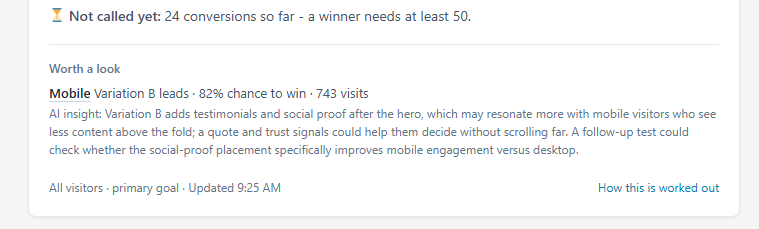
AI results summary. Every test gets a plain-English read of its results: which version leads, the evidence, and up to two segments worth a look, each with a one-click link to that view. It appears on the Results tab and on shared public reports, and a completed test keeps its summary for good without further AI calls.
CRO Learnings. Completed tests are recorded and fed into every suggestion the plugin makes. See CRO Learnings.
Variation Check. Variations are screenshotted and checked minutes after you publish. See Variation Check.
Local and private sites. AI CRO analysis now works on .test, localhost and private IP addresses.