
Magic Mode: point-and-click tests
Teams Included on the Teams plan. Not available on the Lite version. Upgrade →
Magic Mode is the fastest way to get a test running. You open your own site, click the thing you want to change, change it, and launch. No builder, no classes, no code.
Starting a test
- Log in and visit the page you want to test on the front end.
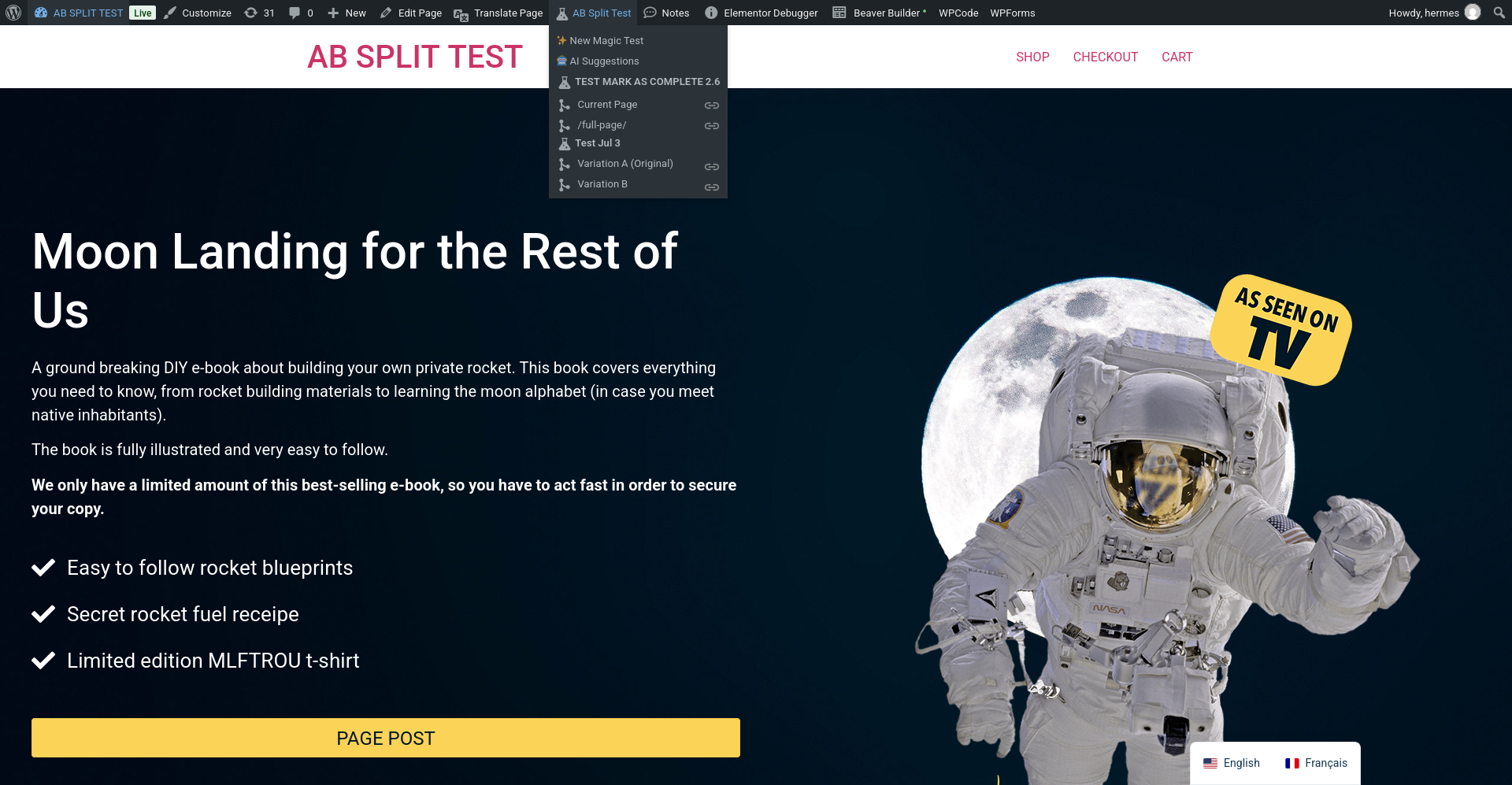
- In the admin bar, open AB Split Test and click ✨ New Magic Test.
- Click any element on the page. The magic bar opens with that element selected.
- Make your change, then add more changes if you want - a variation can be several edits at once.
- Name the test, pick a conversion goal, and launch.
What you can change
Magic tests support text, HTML, images, hiding an element, moving one, inserting content after one, style changes and attribute changes. That covers most of what a page actually needs: headline wording, button copy, a hero image, burying a distracting block, promoting a form up the page.
Everything is recorded as a change to the original element, so your page keeps its markup and your builder keeps working normally. Nothing is duplicated into the page.
The rest of the dropdown
The same admin-bar menu is the fastest way to check on what is already running:
- AI Suggestions asks CROassist to read the current page and hand back ranked test ideas.
- Every test running on this page is listed by name, with each variation beneath it. Click a variation to view the page as that variation, or use the link icon to copy a shareable preview URL for a client.
- Click the test name to jump straight to its results.
Notes
- The admin bar only appears for logged-in users, and logged-in users are excluded from test traffic, so browsing your own test never skews the numbers.
- Magic tests can also be built on an external domain you have tracked, so the variation is built on the real site rather than a WordPress copy of it.
- If the dropdown is missing, check that the WordPress admin bar is enabled for your user, and that AI features have not been switched off if what you are missing is AI Suggestions.
New in 2.6.13
Point-and-click tests are now on the free plan. You no longer need a paid plan to build a Magic test.
A guided tour replaces the old help box. Press How it works in the Magic Bar to walk through picking an element, writing variations and choosing a goal.
A breadcrumb shows which element you are on, so you can step up to a parent when a click lands on the wrong layer.
ChatCRO answers arrive as test cards. Hover one to preview the change on the page, press Try to apply it, and add it as a variation if you like it.
On phones the Magic Bar is a bottom drawer. Drag the handle or the title row to resize it, tap to switch between half and full height, and the page keeps its own sticky headers and popups.
Winners now show to visitors. Once a Magic test is implemented (Autocomplete, or Mark complete with “Forward all traffic”), visitors see the winning version instead of the original.