
All / AI / Getting Started
The Optimization Hub
Teams Included on the Teams plan. Not available on the Lite version. Upgrade →
The Optimization Hub is the landing screen for AB Split Test. It pulls your live tests, your idea backlog, the CROAssist AI analysis of your site and your tracked competitors into one place, so you can see what is running, what it is doing, and what to try next without moving between screens.
It replaced the old CRO Hub in version 2.6.2 and became the first screen you see when you click AB Split Test in the WordPress admin menu.
Where to find it
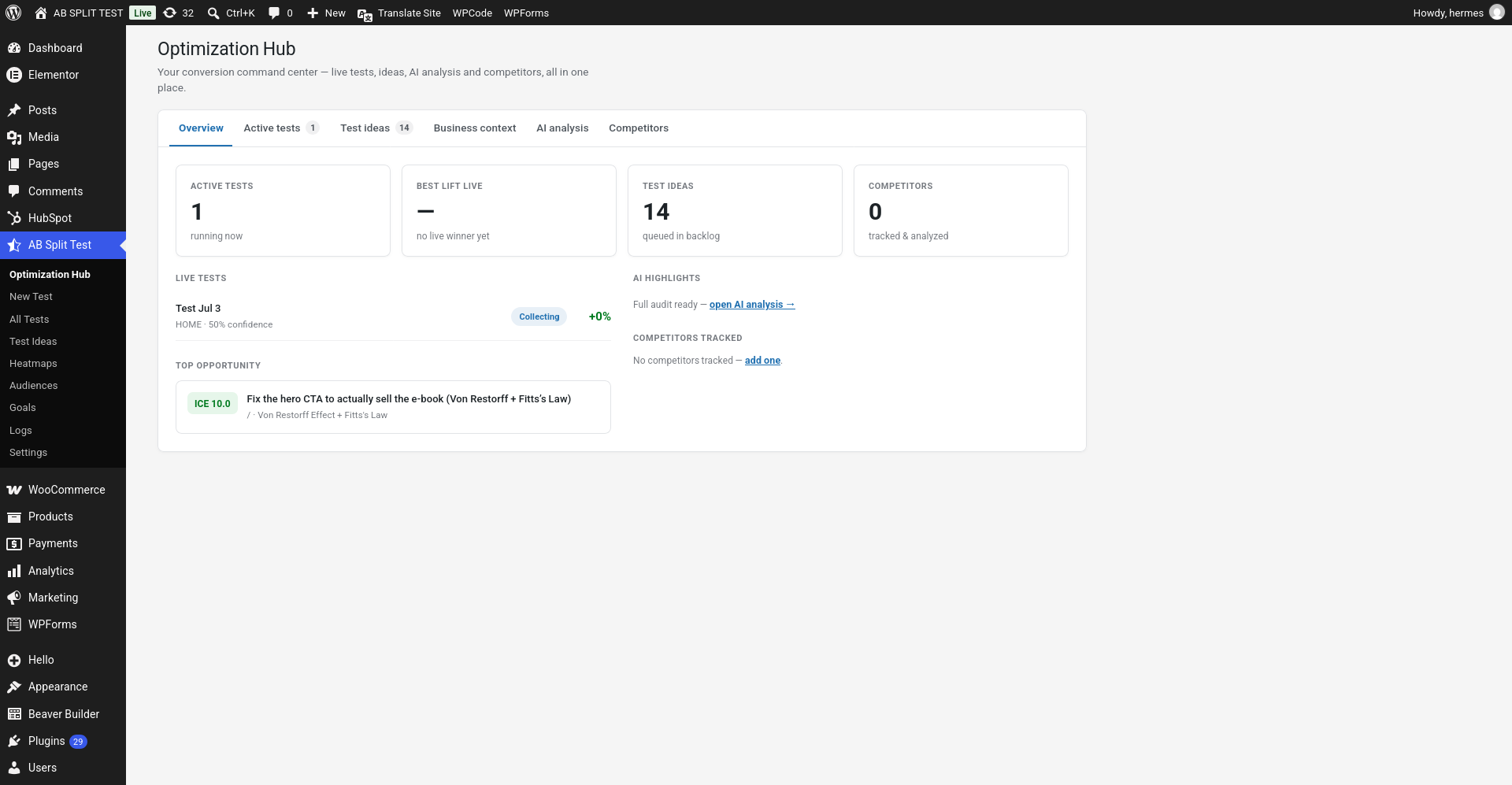
In your WordPress admin, go to AB Split Test > Optimization Hub. It is the first item in the menu.
If you do not see it, AI features have been switched off for this site. Re-enable them under AB Split Test > Settings > Integrations > AI Assist by unticking Turn AI off, or see Disable AI Integration.
The six tabs
Overview
A condensed dashboard with four headline numbers across the top:
- Active tests – how many tests are running right now.
- Best lift live – the strongest uplift among your running tests, with the confidence reached so far.
- Test ideas – how many ideas are queued in your backlog.
- Competitors – how many competitors are being tracked and analysed.
Below that, Live tests lists each running test with its status and current lift, Top opportunity surfaces the single highest-scoring idea in your backlog, and the right-hand column shows AI highlights and the competitors you are tracking.
Active tests
Every running test with its variation labels, confidence and current lift. Use this when you want the state of play across all tests at once rather than opening each test in turn.
Test ideas
Your prioritised backlog. Ideas arrive here from three places: the CROAssist AI analysis, competitor comparisons, and anything you add by hand.
Each idea can be scored on four ratings, and a priority score appears once all four are filled:
- Impact – from Very Low (a minor UI tweak) to Very High (directly drives revenue).
- Reach – from Very Few (a buried or edge-case page) to Most (homepage or a global element).
- Confidence – from Guess (an untested hunch) to Proven (industry data or a prior win).
- Effort – from Minutes (a quick copy change) to Weeks (a major project).
The score is Impact + Reach + Confidence + (6 − Effort), so lower effort raises priority. Only a title and a hypothesis are required - the ratings are optional.
From any idea you can click Build with CROAssist, which opens the page with the variations pre-built in the Magic Bar or asks CROAssist to draft the test from the idea’s full context. You can also Edit the idea, or Ignore it to clear it from the list. The same backlog is also shown on the dedicated Test Ideas page.
Business context
What you tell AB Split Test about your business - what you sell, who you sell it to, and what counts as a conversion. CROAssist reads this before it analyses your site, so filling it in makes the suggestions markedly more specific. Without it the AI has to infer your goals from your page content alone.
AI analysis
The CROAssist audit of your own site. It visits your pages, screenshots them, reads the content, and returns findings mapped to conversion principles, each with a test idea attached. Run it from this tab and the resulting ideas land in your backlog.
Competitors
Add competitor URLs and CROAssist analyses them the same way it analyses your site, then produces a structured comparison - what they do that you do not, where your messaging is weaker, and which differences are worth testing. Each competitor is labelled by type and, where it can be detected, their pricing.
Automatic scans
If no analysis has run in the last 28 days, AB Split Test schedules a background CRO scan automatically, so fresh ideas are waiting for you in the Hub and in your weekly report email. These automatic scans run on our hosted AI service and do not use your AI credits.
You can turn this off under AB Split Test > Settings > Integrations > Automatic CRO Scans if you would rather run every analysis manually.
If the AI analysis fails
The most common cause is a firewall or bot-protection service blocking the analyzer before it can read your pages. See Cloudflare verification blocking AI Analysis for the two-minute fix.
The Learnings tab
Every completed test is recorded as a learning: what changed, what happened, how sure we are, and a short written lesson. The AI reads them before every suggestion, so ideas build on what won and stop repeating what lost.
Your older tests are backfilled automatically. Full details in CRO Learnings.