
Audiences: reusable visitor segments
An audience is a saved group of visitors - people who arrived from Google Ads, or from ChatGPT, or on a phone on a weekend. Attach one to a test and you get an extra slice of that test’s results, so you can see whether the winner won for everyone or only for one kind of visitor.
Audiences do not decide who enters a test. That is the job of the test’s own Visitor Segmentation settings. An audience only adds a results subset within the visitors the test already accepted, and those subsets can overlap.
Creating one
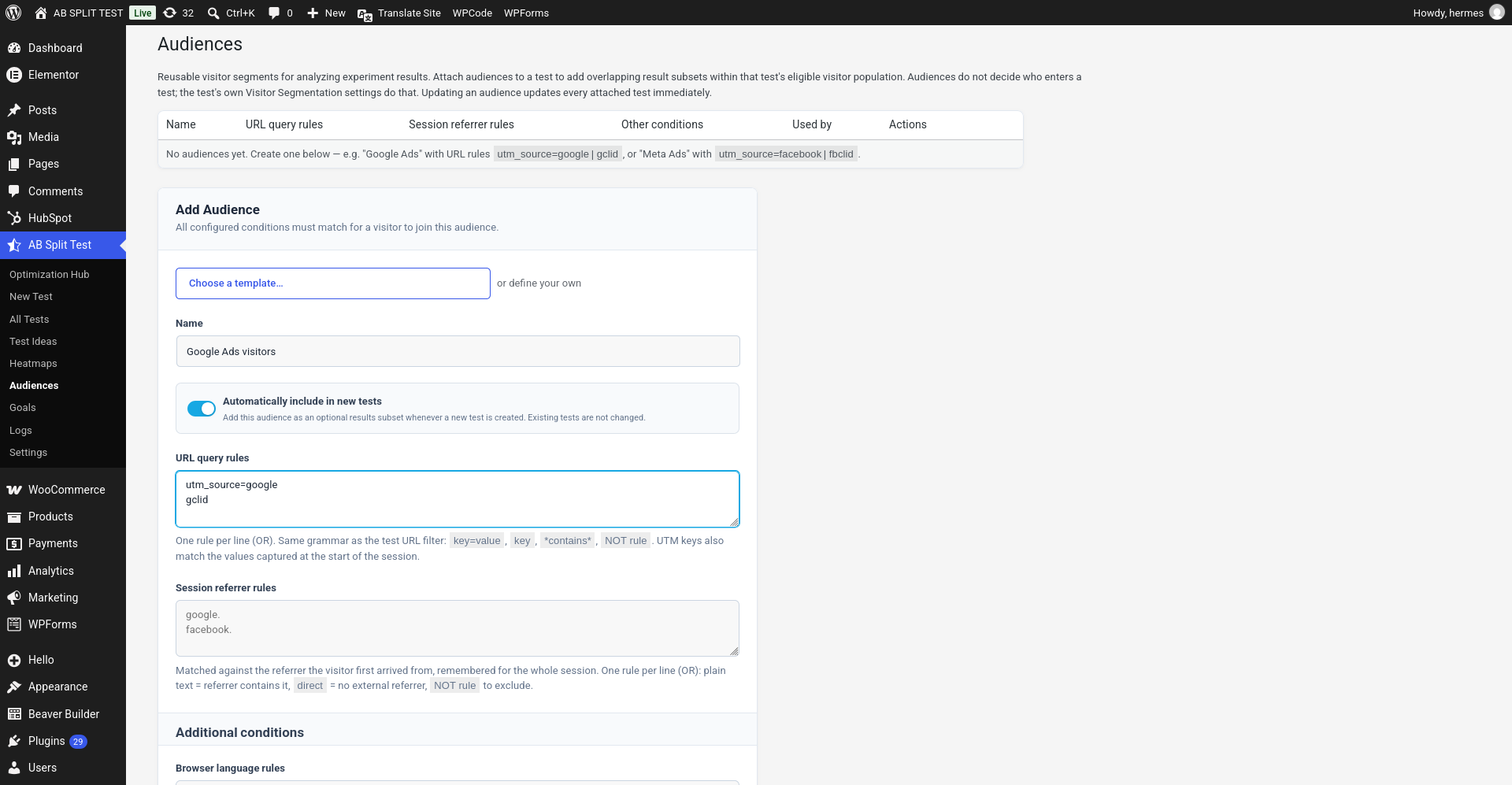
- Go to AB Split Test > Audiences. Five starter audiences are already there; use the Add Audience form to create another.
- Pick something from Choose a template, or define your own.
- Give it a name you will recognise in a report - “Google Ads visitors” beats “Audience 3”.
- Save. It is now available to attach to any test.
The templates
The template dropdown fills in the rules for the traffic sources people actually ask about: Google Ads, Meta Ads, Microsoft Ads, TikTok Ads, Google Search, YouTube, LinkedIn, Reddit, X, Pinterest - and, increasingly worth watching, the AI assistants: ChatGPT, Claude, Gemini, Perplexity, Microsoft Copilot, Grok, DeepSeek, Mistral and Poe.
Pick a template and you can still edit the rules afterwards. Nothing is locked.
Writing your own rules
Two boxes do most of the work, and both take one rule per line, matched as OR:
- URL query rules - same grammar as the test URL filter:
key=value,keyon its own,*contains*, orNOT ruleto exclude. UTM keys also match the values captured at the start of the session, so a visitor who landed on an ad and then browsed for ten minutes still counts. - Session referrer rules - matched against where the visitor first arrived from, remembered for the whole session. Plain text means “referrer contains this”,
directmeans no external referrer, andNOTexcludes.
Under Additional conditions you can also match on browser language, browser, operating system, days of the week, time of day and cookies.
Conditions of different types are combined with AND: a visitor has to satisfy every box you filled in to join the audience.
Two things worth knowing
- Automatically include in new tests adds the audience as an optional results subset to every test you create from then on. Existing tests are untouched. The five starter audiences created on your first visit - Google Search visitors, Google Ads visitors, Meta Ads visitors, Email visitors and AI assistant visitors - have it switched on. Edit or delete them freely; deleted ones are not added back.
- Editing an audience updates every test using it, immediately. Unlike goals, audiences are not copied into a test - they are referenced. Widen the rules and the historical subsets widen too, so rename rather than repurpose if a test is mid-flight.
Once a test has data, its results screen and its public report let you switch between the full population (All eligible visitors) and each attached audience. Treat the subsets as directional: splitting a sample four ways leaves each slice with a quarter of the visitors, and confidence needs at least 50 visits per variation before it means anything.