
Version 2.4.1 new features walkthrough
We just released version 2.4.1 with some features you've been asking for. Here's what's new.
Share Test Results With Anyone (No Login Required)
If you've ever needed to share your test results with a boss or client who doesn't have a login, you know the hassle. Creating PDFs, exporting screenshots, writing up reports.
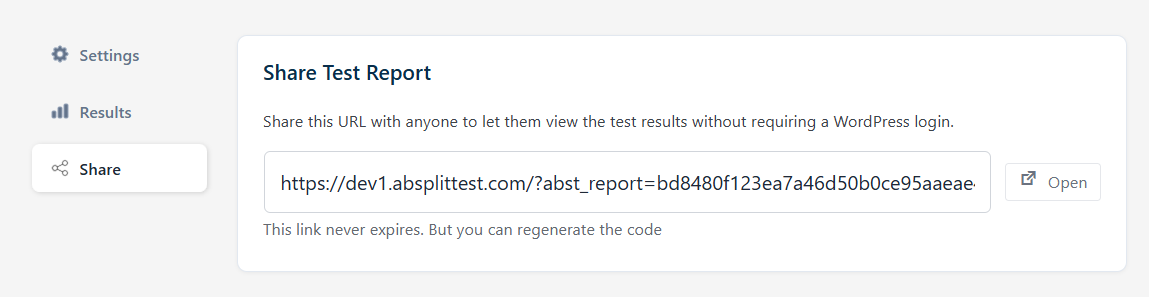
Now you can share public reports instead.
How It Works
Head to any test and click the Share tab. You'll get a unique link that's impossible to guess. Share that link with anyone, whether they have a login or not.
They'll see:
- All your test statistics
- Primary goals and sub goals
- Preview of each variation so everyone understands which version is which
This makes it much easier to communicate results with bosses, clients, and stakeholders. Create the test, share the link, done.
Form Submission Conversion Tracking
This is a big one for lead generators and anyone tracking form submissions. Contact forms, lead capture, demo bookings, newsletter signups.
Now when you create a test, whatever form plugins you have installed will automatically show up in your conversion goals.
Supported Form Plugins
- Contact Form 7
- WPForms
- Gravity Forms
- Ninja Forms
- Formidable Forms
- Fluent Forms
- Elementor Forms
- Bricks Forms
- Beaver Builder Forms
We support all the major form plugins. If you need one that's not listed, send us a message and we'll add it.
Other Updates & Fixes
Beyond those two main features, we've added several improvements and fixes.
New Function: Get or Set Experiment Variation
If you want to do server side testing, you can now use this function. It makes it easy to get or set the current variation for a user.
Choose When Test Visits Are Logged
You now have the option to choose whether a test visit is logged when the page loads (default), or when the element becomes visible.
This is useful for dynamic content and elements below the fold. If you only want to measure visitors who actually see your test content, you can enable this option.
Learn more about visit tracking options
Updated Statistical Analysis for Revenue Tests
If you're running WooCommerce revenue based tests, the plugin will now predict how long the test will take to reach statistical significance. Previously this only worked on standard conversion tests.
Cleaner User Interface
We've cleaned up the UI throughout the plugin. Everything looks cleaner and more polished.
Bug Fixes
We've fixed numerous bugs in this release. You can see the full list in our changelog.
Get The Update
Not using AB Split Test yet? Start with a 7 day Pro trial, then continue using the free version forever. No credit card required.