
A/B Testing on WordPress: A Complete Guide
Most WordPress sites convert between 1 and 4 percent of their visitors. The other 96 to 99 percent leave without doing anything.
A/B testing is the most direct way to change that. You take something on your site, create an alternative version, show each to a portion of your real visitors, and measure which one converts better. No guessing. No opinions. Just data from the people you are actually trying to convert.
This guide covers everything you need to know to run your first test and build a process that keeps improving your site over time.
What is a conversion rate?
Your conversion rate is the percentage of visitors who take a specific action e.g., buying something, submitting a form, clicking a button, booking a call, signing up for a newsletter.
If 1,000 people visit your site and 30 book a call, your conversion rate is 3 percent.
What counts as a good conversion rate depends on the action you are measuring and the industry you are in. Form submissions and email signups tend to convert at higher rates than purchases. The point is not to benchmark against an industry average and it is to improve your own number over time.
What is A/B testing?
A/B testing means showing two different versions of something to real visitors and measuring which one performs better.
Version A is the original. Version B is a changed version or maybe a different headline, a different button color, a different layout, or a different offer. Visitors are randomly assigned to see one or the other. After enough data has been collected, you can see which version converted more visitors.
The key word is "randomly." Both versions need to run at the same time on the same audience. Testing version A this month and version B next month will not give you valid results and too many things change over time to isolate what caused any difference.
A/B testing versus split testing
People use these terms interchangeably and in practice they refer to the same thing. The distinction sometimes made is:
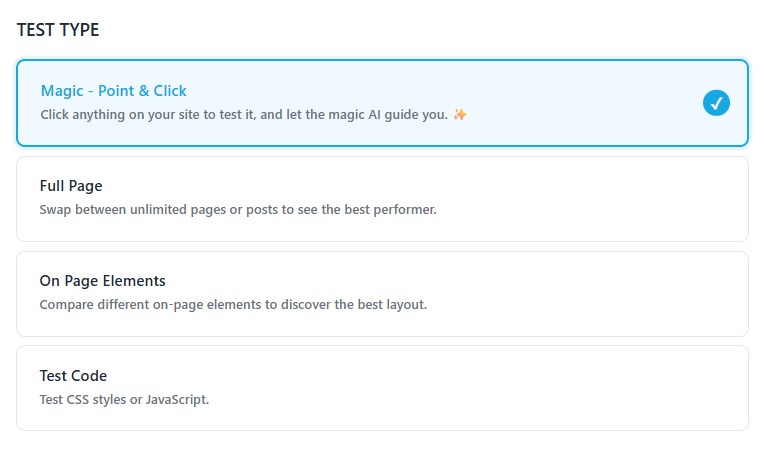
- A/B test - testing different versions of elements on the same page (different headline, different button copy, different image)
- Split test - testing two entirely different pages against each other by redirecting traffic between them
AB Split Test supports both. The approach you take depends on what you are trying to test.
Why it matters more than most optimization tactics
Most ways of improving a website involve making a change and hoping it helped. A/B testing is different because it gives you a concrete number.
You do not need to argue about whether the new headline is better. You run the test and the data tells you. That removes opinion from the process entirely and means every change you make is backed by evidence from your actual visitors.
It also compounds. Each winning test improves your baseline. The next test starts from a higher conversion rate. Over time, even small improvements stack up significantly.
How to build a test that works
The most common reason A/B tests fail is not the test itself. It is choosing the wrong thing to test.
A good test starts with a problem identified from real data, not a hunch. The process looks like this:
Step 1: Find the problem
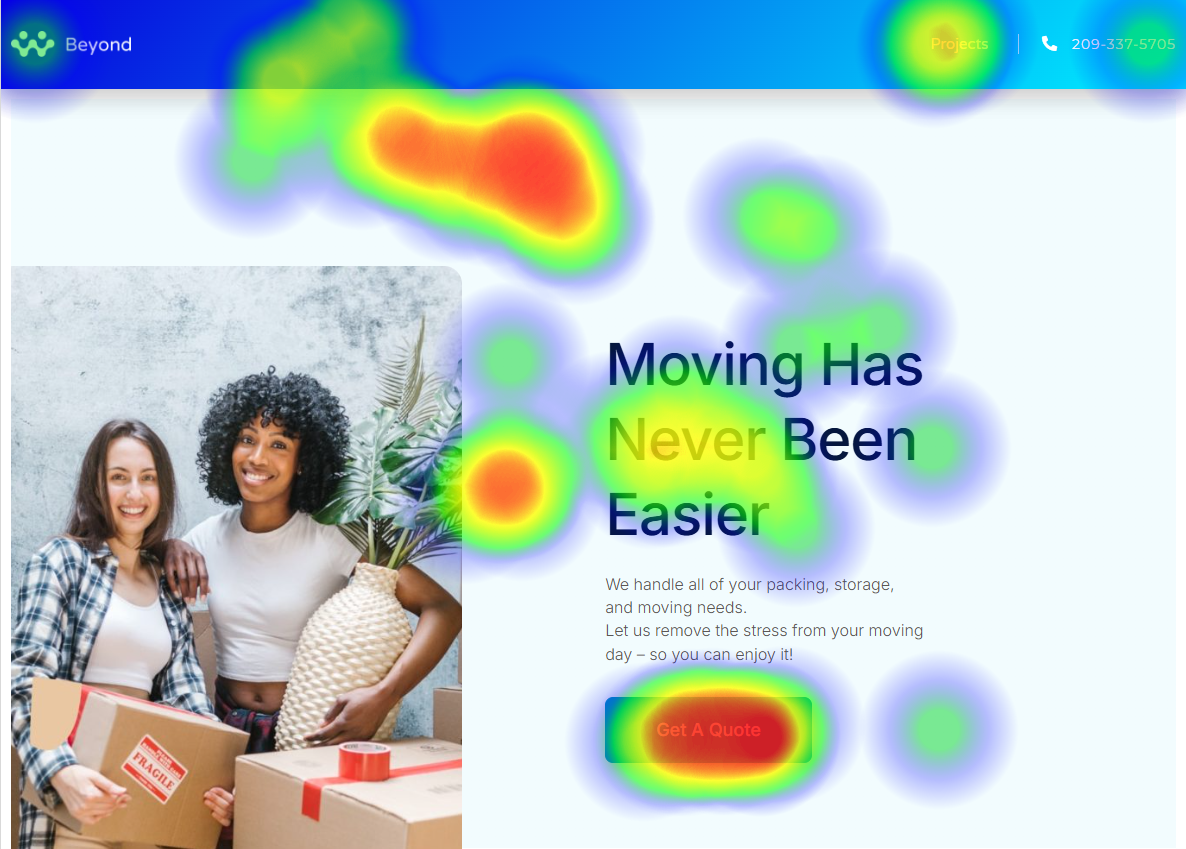
Use heatmaps to see where visitors click, how far they scroll, and what they ignore. Use session replays to watch real visitor behavior. Ask visitors directly: "Did you find everything you needed today?" is one of the most effective feedback questions you can put on a site.
Step 2: Form a hypothesis
A good hypothesis has three parts: what the problem is, why you think it is happening, and what you think will fix it.
Example: visitors are not scrolling past the hero section (problem), because the headline does not clearly explain what the product does (theory), so testing a more specific benefit-focused headline should increase scroll depth (solution).
Step 3: Decide what to measure
Pick one primary conversion goal before you build the test. Page visit, button click, form submission, scroll depth, time active, or purchase completion. Keep it simple, one goal per test.
Step 4: Create the variation
Change only one thing at a time. If you change the headline and the button color and the image simultaneously, you will not know which change made the difference.
Use Magic Mode in AB Split Test to click any element on your page and get AI-generated variations instantly. For full-page tests, create a duplicate page and make your changes there.
Step 5: Run the test and wait
Run both versions simultaneously on the same audience. Give the test enough time and at minimum one full week, ideally two. Behavior varies by day of the week and time of month, so short tests tend to produce misleading results.
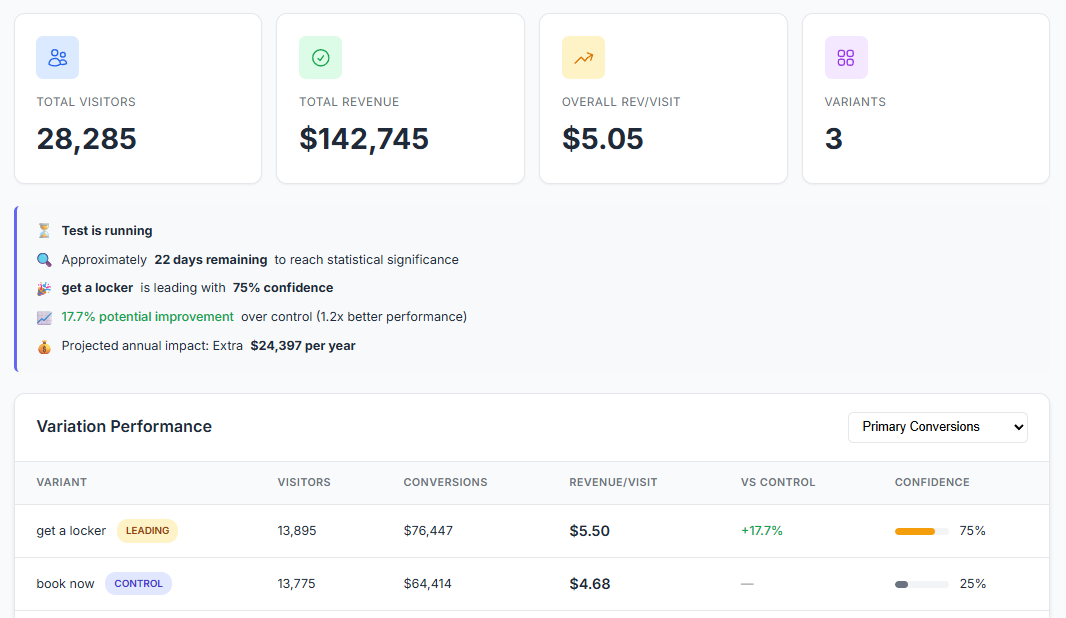
AB Split Test handles the statistics automatically with Autocomplete. When there is enough data to declare a winner reliably, it promotes the winning variation automatically. You do not need to check the results daily or do any calculations.
What to test first
Start with your highest-traffic page and the element most visitors interact with. For most sites that is the homepage hero and the main call to action.
Other high-value things to test:
- Hero headline copy - benefit-focused versus problem-focused
- CTA button copy - "Get Started" versus "Try It Free" versus "See How It Works"
- Social proof placement - near the top versus near the CTA versus below the fold
- Form length - fewer fields versus more fields
- Pricing presentation - which plan is shown as default, how savings are displayed
If you are not sure where to start, run heatmaps for two weeks first. The data will tell you where visitors are dropping off and what to focus on.
The Test Ideas feature in AB Split Test lets you log ideas as you find them, score each one by Impact, Reach, Confidence, and Effort, and work through them in priority order.
Common mistakes to avoid
Testing too many things at once Change one element per test. Multivariate testing is possible but requires much more traffic to reach significance.
Stopping the test too early A variation that is up 30 percent after two days is almost certainly noise. AB Split Test shows an Underpowered badge when results are not yet reliable so wait for that to clear before acting.
Testing low-traffic pages You need enough visitors to collect statistically meaningful data. Start with pages that already get decent traffic. On lower-traffic sites, use higher-funnel conversion goals like scroll depth or time active to get data faster.
Testing without a hypothesis Changing a button color because you read a case study about it is not a hypothesis. Build from real data - heatmaps, session replays, or visitor feedback before you write a single variation.
What AB Split Test does for you
AB Split Test is a native WordPress plugin everything runs inside your own install with no external servers, no remote cookies, and no third-party data collection. All your test data is yours.
It works with every major page builder: Elementor, Bricks, Beaver Builder, Gutenberg Blocks, WP Bakery, Breakdance, Oxygen, and more. You can test full pages, individual elements, CSS changes, or anything in WordPress.