
Admin Bar Helper
What is the Admin Bar Helper?
The Admin Bar Helper is a built-in tool that appears in the WordPress admin bar when you're logged in and viewing a page with an active AB Split Test. It lets you:
- Preview different test variations without affecting test results
- Access Magic Test features directly from the frontend
- See which variation is currently showing on the page
- Quick access to Heatmaps/Click maps/Scroll Maps
- Quick access to test settings and results
What it looks like: You'll see "AB Split Test" in the WordPress admin bar.
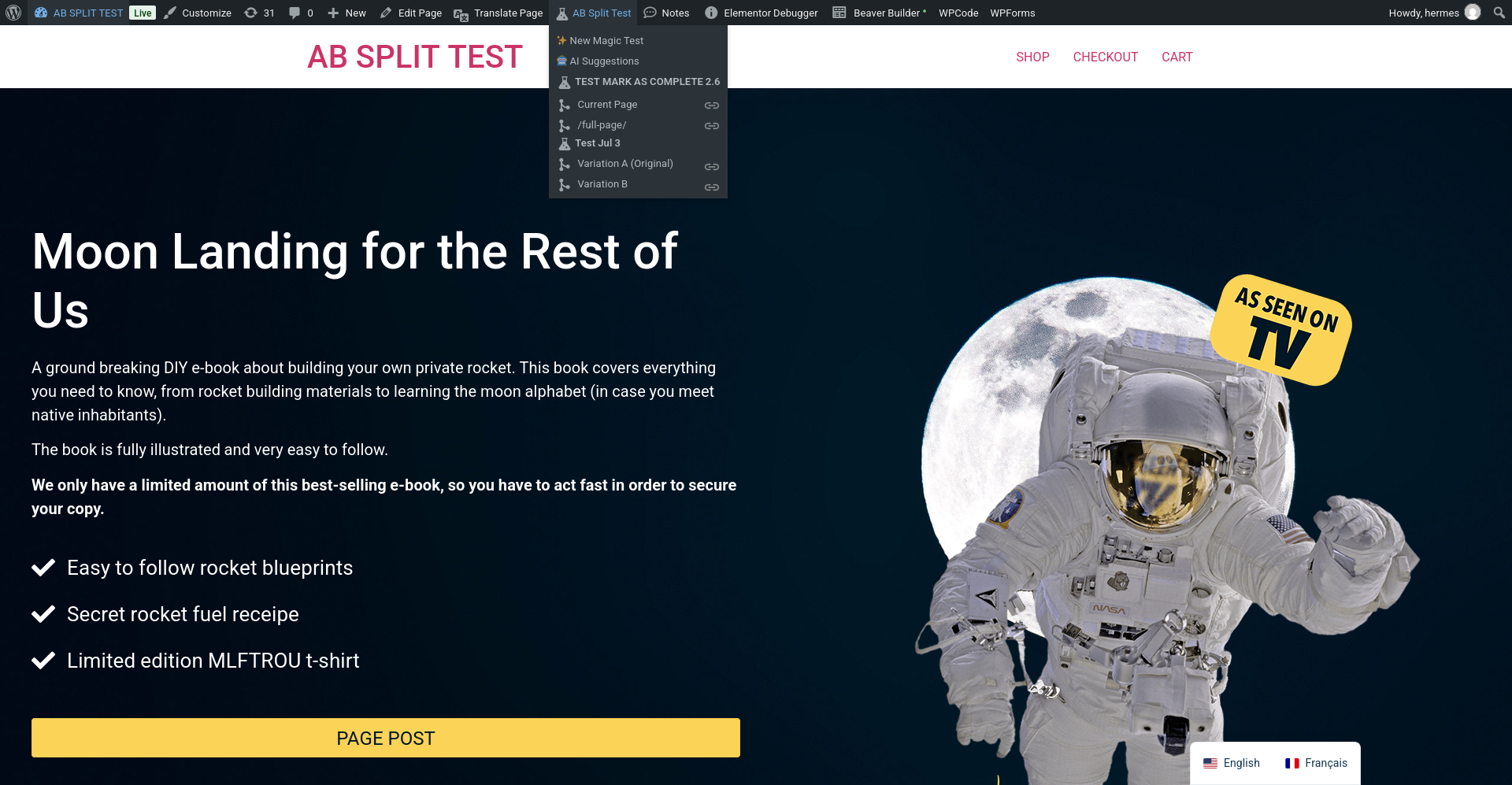
Admin Bar Helper Features
1. Quick Action Buttons
At the top of the dropdown, you'll find three powerful shortcuts:
✨ New Magic Test
- Click to start a new Magic Test (point-and-click testing)
- Opens the Magic Test creation interface right on the current page
- Fastest way to create a test without going into the WordPress admin
- Perfect for quick optimization ideas
🤖 AI Suggestions
- Get CROAssist AI recommendations for the current page
- Opens AI chat interface with page-specific optimization ideas
- Analyzes your content and suggests what to test
- Powered by GPT-4 to give you actionable CRO advice
🔥 Heat/Click/Scroll Maps
- Access heatmaps for the current page
- View where users are clicking
- See scroll depth data
- Understand user behavior before creating tests
2. Active Tests List
Below the quick actions, you'll see all tests currently running on this page.
Each test displays:
- Test Name (e.g. "Homepage Hero Test")
- List of variations below the test name
- Link icon next to each variation for copying preview URLs
Multiple tests on one page? No problem - they'll all be listed in the dropdown, each with their own variations.
How to Use the Admin Bar Helper
Accessing It
- Log into WordPress as an Administrator
- Navigate to any page (frontend, not admin)
- Look at the WordPress admin bar (black bar at top)
- Click "AB Split Test"
- Dropdown opens showing features and active tests
Creating a New Magic Test
From the Admin Bar:
- Click "AB Split Test" in admin bar
- Click "✨ New Magic Test"
- Magic Test interface opens
- Click elements on the page to create variations
Getting AI Suggestions
From the Admin Bar:
- Click "AB Split Test" in admin bar
- Click "🤖 AI Suggestions"
- AI chat opens with recommendations for this page
- Get suggestions on what to test
Viewing Heatmaps
From the Admin Bar:
- Click "AB Split Test" in admin bar
- Click "🔥 Heat/Click/Scroll Maps"
- Heatmap interface opens
- View user interaction data
Start Using the Admin Bar Helper
The Admin Bar Helper is available on every page of your site when you're logged in. Just look for "AB Split Test" in the WordPress admin bar and start previewing your test variations.